website statistics

Microsoft Elaborates On Monetization Of Windows 8 Apps Through Ads

Microsoft has posted a blog entry on its Advertising site which explains how Windows 8 apps developers can use ads to monetize their apps.

When do you use Facebook?

View Results

Loading ... Loading ...
1 Star2 Stars3 Stars4 Stars5 Stars (Rate This)
Loading ... Loading ...

Microsoft is gearing up to release its much-touted OS, Windows 8, later this year. However while that is still a few days away, the company has been putting its weight behind the Windows Store so as to have the Windows 8 apps up and running by the time Windows 8 launches. Now, Microsoft has elaborated on how developers can monetize their Windows 8 apps.
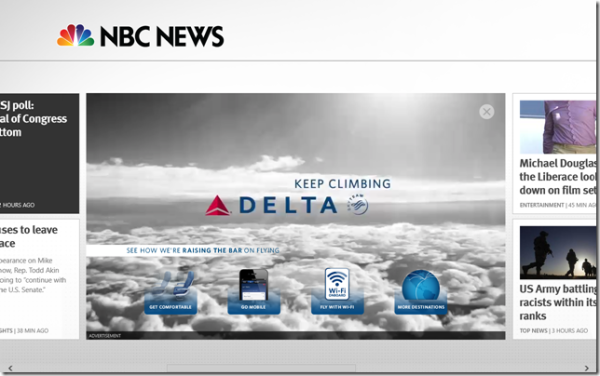

Windows 8 In-app ads

There are a number of ways to monetize Windows 8 apps. Microsoft presents the developers with the option of using in-app transactions to make money or get the money upfront from the users. Alternatively, the developers can let Microsoft display ads in their apps.

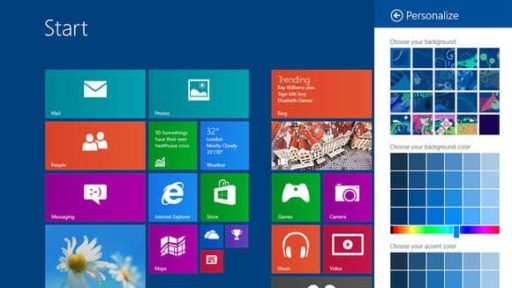
The ads have to be in congruence with the general outlook of Windows 8 apps which make use of the trademark tile interface. To ensure this, Microsoft has presented two scenarios to show how ads in Windows 8 apps will be shown.

One of these involves displaying an ad as a tile on the interface of an app. When the users clicks the tile, it expands to cover the most part of the screen and launches an animation or a video. Another way to display the ad is by presenting it as a half-column to the right side of the app, effectively covering half the screen. When the user clicks this ad, again it expands to cover full-screen and display the ad content in more detail.

Such variety of options to monetize their ads can be very enticing for Windows 8 apps developers. If they know that their app can’t get off with an upfront payment, they can always make use of in-app ads to make money.

Source: Microsoft Advertising

Courtesy: Ghacks

Buy Cheapest Related Product From Amazon.com


IM Applications That Can Replace MSN and Gtalk

Uncover To Sell 3 MacBook Pro Laptops That Will Have Steve Jobs’ Shadow
You can also press the left/right arrow key on your keyboard to go to previous/next post
  On October 7, 2012(7 months, 18 days ago.)

Recent Search

Recent Tutorials

This tutorial will show how to use S.M.A.R.T. (Self Monitoring Analysis and Reporting Technology) to continuously collect information on health of your equipment.
In this tutorial I'll show you how you can easily protect yourself from any kind of security breaks that may occur through Java.
Today Apple enabled "Two Step Verification" for iCloud And Apple ID. But the process is not that simple. But no worry, here we have made a step by step tutorial.
Cant remember your iPhone passcode? Here I will show you some workaround on what to do and how to recover and restore for every possible scenario.
This tutorial will show you how to perform the Winapp2.ini installation inside CCleaner and how to use it under Windows operating system.
With app called AD Sound Recorder, you can record any stream that passes through your sound card or speakers and in this tutorial I will show you how to do that.
If you want to have Boxee app inside your Apple TV, in this tutorial we will show you how to install XBMC and Boxee using Windows on your Apple TV.
This tutorial will show you how to transfer PS3 Saved Game Files from your PC to your PS3 game console.
Adding videos from external sources such as internet, more specifically from YouTube, is a great solution to enhance a presentation; in this tutorial I will show you the procedure.
If you are one of new comers to Windows Phone 8, like me, in this tutorial I will walk you through the process to update your Windows Phone 8 device.
Close You Have To Login
User:
Pass:
Login With »Login With TwitterLogin With Facebook