website statistics

Scientists Developed Mind Controlled AR.Drone

Scientists from Zhejiang University have devised a mind/brain control interface for the Parrot AR.Drone 2.0.

When do you use Facebook?

View Results

Loading ... Loading ...
1 Star2 Stars3 Stars4 Stars5 Stars (Rate This)
Loading ... Loading ...

Would you like to control a drone from your mind? Scientists have a solution. You can control an AR.Drone, especially Parrot AR.Drone 2.0, using your thoughts. Using an off-the-shelf Emotiv Electroencephalography (EEG) headset, a user can control an AR.Drone with his/her thoughts alone.
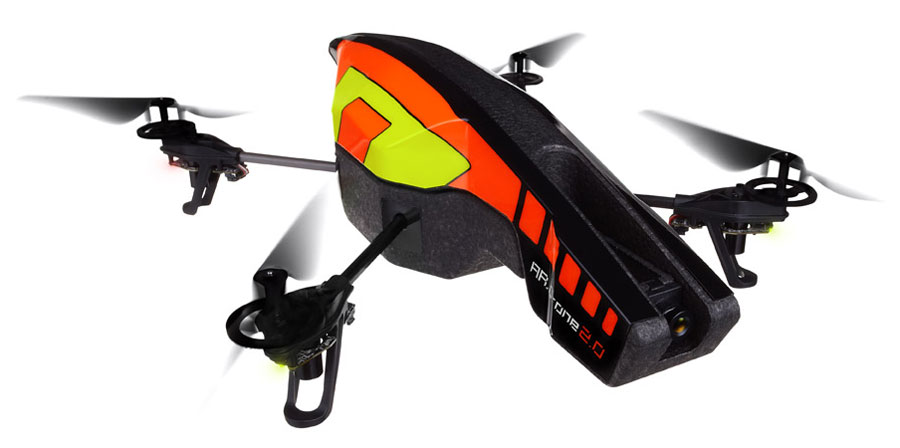
http://cdn.thetechjournal.com/wp-content/uploads/images/1206/1339425056-parrot-ardrone-20-quadricopter-can-be-an-ideal-fathers-day-gift-2.jpg

Scientists from Zhejiang University in Hangzhou, China have devised the mind/brain control interface for the Parrot AR.Drone 2.0. Prior to this, the Parrot AR.Drone was controlled by iPod touch/iPhone/iPad/Android Devices (details can be found in our earlier post). The interface has taken the controlling to a new level through an Electroencephalography (EEG) device. This EEG device has to be strapped around the head, which then records electrical activity along the skull. It also measures which parts of EEG device wearer’s brain are active and which aren’t.

A user can control an AR.Drone with his/her thoughts using the EEG device. First, the user’s thoughts/commands are relayed to a laptop via Bluetooth and later the thoughts/commands are transferred to the hovering aircraft by wireless. A user can move the hovering AR.Drone forward by thinking “right”, fly up by thinking “push”, turn clockwise by thinking “left”, take off from the ground by thinking “left hard”. Clenched teeth is a sign of commanding the AR.Drone to descend. Blinking is a sign of commanding the AR.Drone to take a picture using the on-board camera. The on-board camera sends a stream of video back to the laptop. The EEG device wearer can capture any still photo/scene by blinking four times.

Scientists are going to present the system at the Ubiquitous Computing Conference in Pittsburgh, Pennsylvania next month. We hope scientists would say at their presentation something like this, “Maybe one day in the future, people can use brain (control) to drive a plane in which they are seated, and go anywhere they want to go.”

Source : New Scientist

Buy Cheapest Related Product From Amazon.com


Samsung Introduces Android 4.1 Powerded 16 MP Galaxy Camera With 21x Optical Zoom

Withings Brings WS-30 Wireless Scale And Health App At IFA 2012
You can also press the left/right arrow key on your keyboard to go to previous/next post
  On September 1, 2012(8 months, 26 days ago.)

Recent Products

Buy Now | Compare  
Buy Now | Compare  
Compare  

Recent Search

Recent Tutorials

This tutorial will show how to use S.M.A.R.T. (Self Monitoring Analysis and Reporting Technology) to continuously collect information on health of your equipment.
In this tutorial I'll show you how you can easily protect yourself from any kind of security breaks that may occur through Java.
Today Apple enabled "Two Step Verification" for iCloud And Apple ID. But the process is not that simple. But no worry, here we have made a step by step tutorial.
Cant remember your iPhone passcode? Here I will show you some workaround on what to do and how to recover and restore for every possible scenario.
This tutorial will show you how to perform the Winapp2.ini installation inside CCleaner and how to use it under Windows operating system.
With app called AD Sound Recorder, you can record any stream that passes through your sound card or speakers and in this tutorial I will show you how to do that.
If you want to have Boxee app inside your Apple TV, in this tutorial we will show you how to install XBMC and Boxee using Windows on your Apple TV.
This tutorial will show you how to transfer PS3 Saved Game Files from your PC to your PS3 game console.
Adding videos from external sources such as internet, more specifically from YouTube, is a great solution to enhance a presentation; in this tutorial I will show you the procedure.
If you are one of new comers to Windows Phone 8, like me, in this tutorial I will walk you through the process to update your Windows Phone 8 device.
Close You Have To Login
User:
Pass:
Login With »Login With TwitterLogin With Facebook