
Official DirecTV App for iPad now available and it brings touch controls to your satellite box.DirecTV App has a customizable home screen with favorite channels and modules, you can select your favorite channels to show up first and see what’s playing or find out the sports scores and events for your favorite team or league…….

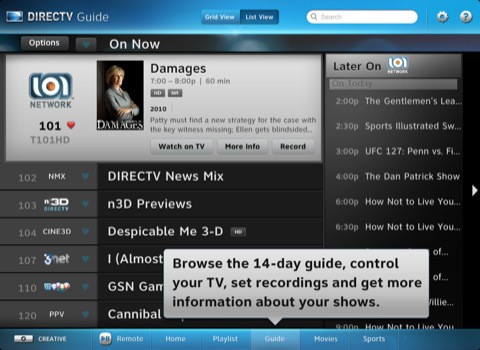
DirecTV customers can now download its iPad app from Apple App Store. This app offers users the ability to remotely control their televisions with built-in controls, set recordings and change the channel. The app also includes a channel guide, the ability to set favorite channels and the option to learn more about the show the person is currently watching.
Features :
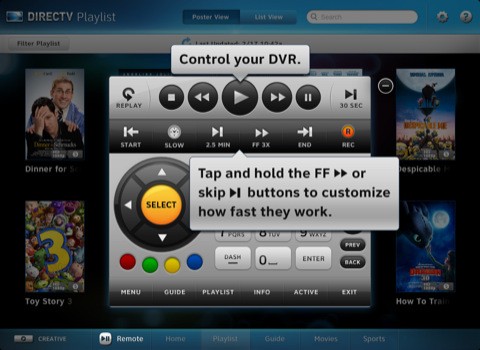
- Highly customizable remote control functionality right on your iPad.
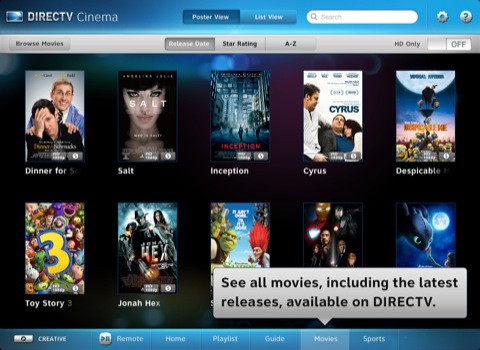
- Browse and discover movies, shows and sports – without interrupting the show you are currently watching on TV.
- Set recordings or channel tune instantly, and access more information on shows, cast & crew, with parental ratings.
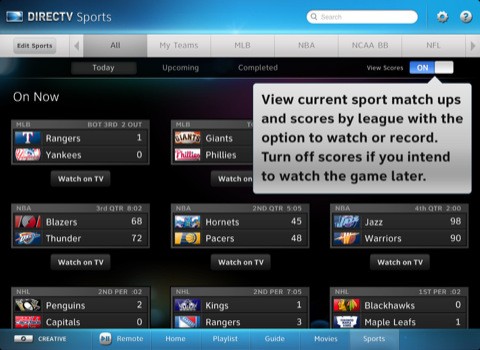
- Access sports scores and schedules and set your favorite teams.
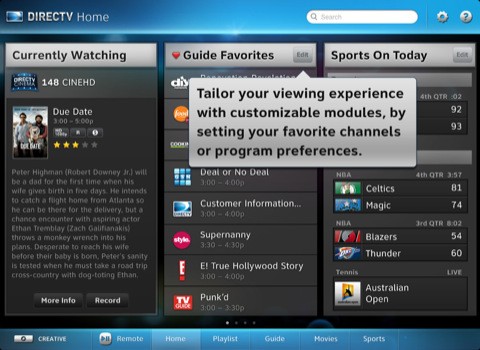
Home Screen (Customizable modules):
- Currently Watching – More information about the show you are watching now and suggestions for similar shows.
- Guide Favorites – List of favorite channels selected through the Guide.
- Channel Guide – Displays up to 14 days of upcoming shows for a selected channel.
- Favorite Channels – Create user preferred lists of channels (by category, his or her list, etc.)
- QuickTune – One-touch selection of your favorite channels by name or icon.
- News Channels – All the news channels in one module.
- Kids & Family – All the kids & family friendly channels in one module.
- Sports – Browse available sports events and scores by game or favorite teams.
Dedicated Tabs (Playlist, Guide, Movies and Sports):
- Organize and view all of your recorded content by poster or list view.
- View list of recorded content for each receiver.
- Search listings up to 14 days in advance by traditional grid view or selected channel.
- View show descriptions, Cast & Crew, Photos, Suggestions & Parental Information.
- Change channels, set recordings and get more information.
- Customize the guide by favorite channels.
- View current sports matchups and scores by league, with the option to watch or record.
Other Features :
- Recording and remote control functionality is available to DIRECTV customers only.
- DIRECTV customers must have a residential home account registered on directv.com http://directv.com to access recording & remote functionality.
- Recording requires a Wi-Fi, Edge or 3G network connection to schedule. Remote control requires a Wi-Fi connection to your home network.
- In rare instances, scheduled recording(s) may not be recognized.
- Available for customers in the USA only.
- Remote scheduling requires DIRECTV PLUS DVR (models R15, R16, R22), DIRECTV PLUS HD DVR (models HR20, HR21, HR22, HR23, HR24) or TiVo® Series 2 receivers with 6.4a software. Receivers do not require phone or broadband connection to schedule a recording.
- Remote control requires DIRECTV PLUS HD DVR (models HR20, HR21, HR22, HR23, HR24 and H21, H23, H24) connected to a broadband connection.
Download DirecTV App For iPad : Here
ScreenShots :
![Read more about the article Jailbreak iOS 4.2.1 Untethered on iPhone 4, 3GS With PwnageTool 4.1.3 & Custom PwnageTool Bundle[How To]](https://thetechjournal.com/wp-content/uploads/2011/02/jailbreak_iphone1-243x300.jpg)
It seems like a very nice app, but I don’t see the point behind it. I have an app that paired with my Sling Adapter I can stream my entire DISH Network programming and DVR collection right onto my iPad. That means that my iPad isn’t just a remote it’s my portable TV. I’m tech support for DISH and I respect a company that can provide innovative technology that is a high quality product the consumer will appreciate.