
iPhone Dev Team has already released Redsn0w 0.9.6 Beta 3 to support iOS 4.2.1 GM IPSW.It can jailbreak all iOS based devices like iPhone 4, iPad, and iPod Touch 4G.While Cydia included in this new version of Redsn0w 0.9.6 Beta 3, which is compatible with iOS 4.2.1.
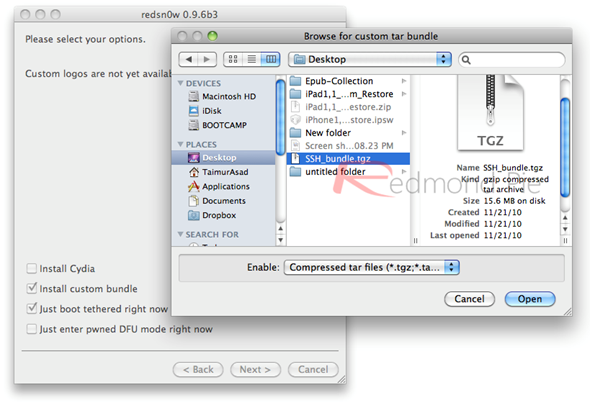
If you want to install the patched version of cydia here’s the simple step by step guideline for you.
Step 1: First Jailbreak your iPhone, iPod Touch devices using the newly released Redsn0w.Jailbreak iOS 4.2.1 GM on iPhone 4/3GS/3G using Redsn0w 0.9.6b2, and Jailbreak iOS 4.2.1 GM on iPod Touch 4G/3G/2G using Redsnow 0.9.6 Beta 2.
Step 2: Now enable SSH by installing the compiled OpenSSH bundle using Redsn0w.
Step 3: Now Download Cydia.patch file for iOS 4.2.1, and copy it to /Applications/Cydia.app/Cydia_Directory by SSH’ing into your iOS device.If you are an Windows user, then use WinSCP whle Mac user can use Cyberduck.Login instructions for SSH can be found below.
For Windows Users “WinSCP” :-
* Hostname: The IP address of your iPad. Setting –> WiFi –>
* User name: root
* Password: alpine
* Protocol: SCP
For Mac Users “Cyberduck” :-
* Server: The IP address of your iPad. Settings –> WiFi –>
* Username: root
* Password: alpine
* Protocol: SFTP (SSH File Transfer Protocol
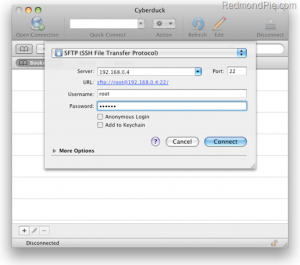
Step 4: Start Terminal app on Mac OS X and while using original Cydia binary from here, just type this following Commands in the Terminal app on Mac OS X :-
ssh root@
Now login as root by entering “alpine” as password.
Once Logged in :-
apt-get update
apt-get install bsdiff
cd/Applications/Cydia.app/
cp Cydia_ Cydia.bak
bspatch Cydia.bak Cydia_ Cydia.patch
chmod +x+s Cydia_
Step 5: From now onwords, you want to use Cydia or SSH into your Device (Whenever), you must first run your device in the “Jailbroken State” on every reboot by using “Just boot tethered rigt now” Option on Redsn0w 0.9.6B3.
That’s all.
Hey I have successfully jailbroken my iphone 3GS… well sort of! Im on the ipad bb and i’m on 4.0.2 fw. first time cydia was a white icon so i did what everyone said and went back into edsn0w and just boot tethered now or whatever it is 🙂 BUT now i have the right icon but still wont load 🙁 ive rebooted a fair few times! Tried checking the install cydia thing again but nothing is working :S I miss my iPhone!! (windows xp)
for more information go to