When Facebook acquired Instagram for a whopping billion dollars, many of us kept wondering that why on Earth would the social network pay such a hefty sum for a photo sharing service. However, when Facebook later stated its ambition to be successful across the mobile platform, it was understandable since Instagram has been a huge success on the mobile devices. A recent development suggests, Facebook might have started to utilize the Instagram know-how in their (Facebook’s) products already. You will know what I mean when you see the recently launched ‘Facebook Camera’ app.
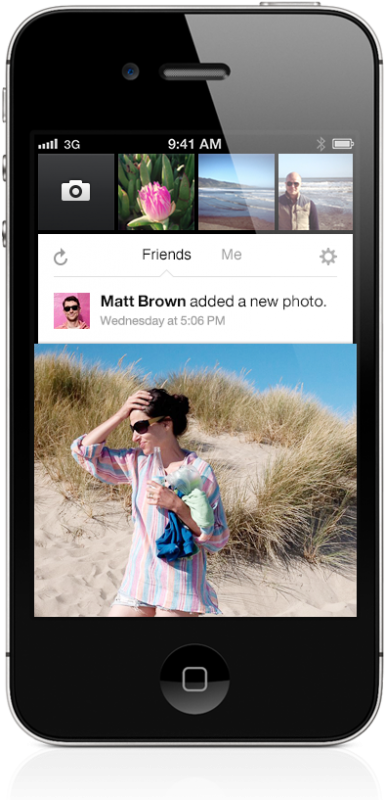
Facebook has launched an app which deals specifically with Facebook images. The app has been launched for iPhone devices, for now. It deals with shooting images, applying filters to them and uploading them in creative badges to the Timeline. Clearly, this is where the creativity and expertise of the Instagram team is being used.
The philosophy behind the app is that people want photos to be shared instantaneously. They don’t want to wait a minute or more to first navigate to the right place and then upload their photos. And this is why ‘Facebook Camera’ is really useful. You bring your iPhone out, you snap, edit for a few seconds and upload the image right to your Facebook profile. That is the beauty of this new app.
Using the App:
All you have to do is get the app on your phone and it will automatically detect the Facebook account that you have associated with your iPhone. Once you log in, you are shown a user interface which is a lot more robust and faster. It has a camera button in the top left corner accompanied by a stream of recent photos. Under these photos is a News Feed of photos from your friends.
Under the News Feed are the rest of your photos. Here, you can select up to 30 photos to upload simultaneously. To edit a photo, tap it and you will have multiple ways to tweak it.
In all, this is perhaps the fastest, most convenient and best way to upload photos from a smartphone to Facebook. Facebook just made photo sharing a lot easier and creative with its Facebook Camera, thanks to the very talented Instagram team that it bagged.
The question remains, though, that will Facebook Camera be competing Instagram or what, since both apps are owned by Facebook now. According to a Facebook personnel, “Enhancing the Facebook photos experience on mobile is long overdue. We really had to step up our game, and we’re committed to building Instagram independently.”
You can dig into further details of ‘Facebook Camera’ over here.
Source: iTunes
Courtesy: The Verge
[ttjad keyword=”social-media-samrtphones”]