
Now a days computer virus is disgusting to all computer users.If you are looking for how to create bootable rescue USB drive then here is small guide to create bootable Bitdefender USB rescue drive.By creating Bitdefender Rescue USB drive you can boot your pc from USB & scan your computer with Bitdefender antivirus scanner to remove or quarantine viruses.
The instructions are as follows.
1. Download Bitdefender Rescue ISO and keep it on desktop
2. Download UNetbootin and save it on desktop
3. Start UNetbootin and select Diskimage option and browse and locate Bitdefender rescue iso file downloaded in step 1.
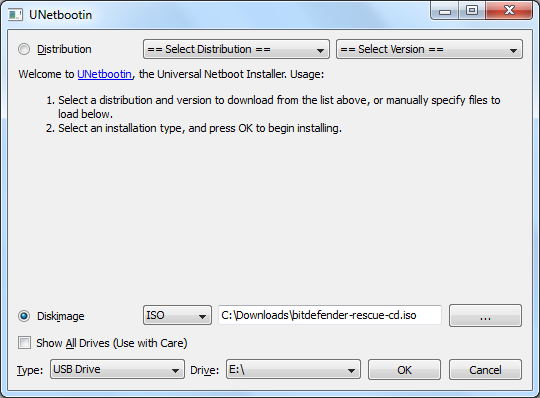
4. UNetbootin will automatically detect connected USB drive, if you wish to install Bitdefender on another removable drive then use drive drop down menu to select appropriate USB drive.
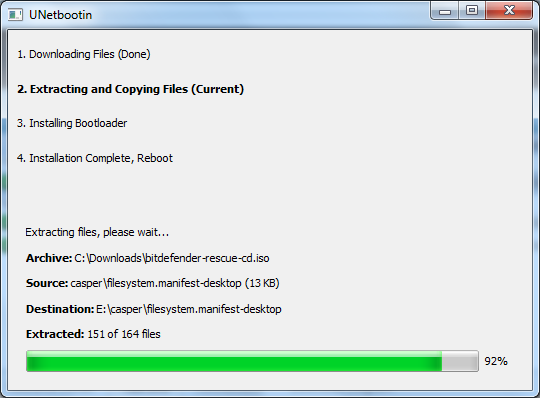
5. Now click OK button to initiate Live USB creation process. Once UNetbootin completes process and displays message “Installation Complete, Reboot”, your Bitdefender Rescue USB is ready.
That’s all.
Let’s know how it work.
![Read more about the article [Tutorial] How To Solve The Problems With Sound In Your Windows](https://thetechjournal.com/wp-content/uploads/2012/05/find-audio-problems-tool.webp)
![Read more about the article [Tutorial] How To Stop Applications From Updating Automatically In Windows](https://thetechjournal.com/wp-content/uploads/2012/03/automatic-application-update-logo.webp)
![Read more about the article [Tutorial] How To Disable Missing Extensions Notification In Mozilla Firefox](https://thetechjournal.com/wp-content/uploads/2012/05/about-config.webp)