Data is often deleted off the memory card of a phone by mistake. And this mistake can turn quite serious if the data that has been deleted is an important one and is required by the user later. However, there may be a way to restore your lost data after you have deleted it by mistake. DiskDigger is here to help the Android users who have a knack of mistakenly deleted their data off memory cards.
DiskDigger is not a new name. In fact, if you are a Windows users, you are probably well aware of this tool. It pretty much offered a similar functionality for Windows machines, helping Windows users restore their data which they mistakenly delete.
The good part is that now the tool, in all its power and glory, is landing on Android devices. The Windows version, as well as the Android release of DiskDigger is free. Nonetheless, you will still require root access to make it work.
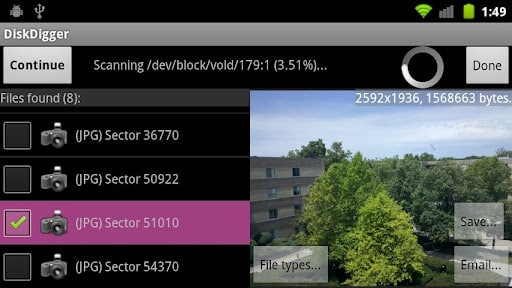
For now, the team behind the tool has launched just a beta version. It has a very simple interface and is able to retrieve recently deleted photos and images for you. In doing so, DiskDigger makes use of a whole host of technologies.
When you launch DiskDigger on your Android phone, you then have to selected the location to ‘scan.’ DiskDigger then scans the location and presents files deleted from that location. Once you see the files on the left hand side of the pane, you can select the ones you want back and hit ‘Save.’ Here you will be presented with the option of saving the files to a location of your own choice.
You can download DiskDigger from Google Play.
Source: Google Play
Courtesy: Redmondpie
[ttjad keyword=”android-phone”]

![Read more about the article [Tutorial] How To Turn Off Location In Facebook Messenger In Android](https://thetechjournal.com/wp-content/uploads/2014/11/FBM-432x768.png)
![Read more about the article [Tutorial] How To Record Live Video Streams Using VLC Player?](https://thetechjournal.com/wp-content/uploads/2012/11/vlc-live-strea-video-recording-ttj-logo-512x158.jpg)