
When you read your emails, you use a web mail clients such Gmail, AOL, Hotmail or Yahoo for example. Whenever you read emails using those online clients you need to have access to internet. If you need to take your emails wherever you go, you can download all your messages in a mail program on your computer or on a memory stick and then read them later or when you need them. This is also good a way to keep a copy of your important messages on your computer. In this tutorial I will show you how to use Thunderbird to retrieve your emails from the Internet, while leaving a copy on your web mail. You can access all your messages from the Internet, but also from your USB drive. Of course, this latest version contains all the messages until your last login.

Before proceeding to below steps make sure you download Thunderbird Portable from this link and copy downloaded file anywhere with you. The reason why we use a portable version of Thunderbird is because you can put on your USB drive and then carry your emails with you.
Note: For this tutorial I will be using my favorite webmail Gmail, however this process will work in any other such as Yahoo Mail, Hotmail, AOL Mail, etc…
Step 1: Since all webmails by default do not allow the downloading of messages from POP, we will need to enable POP inside webmail. For that first log into your Gmail account.
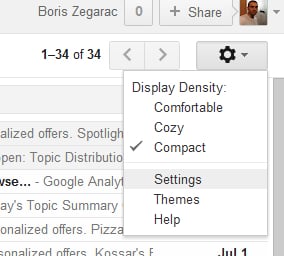
Step 2: Click gear button located at the top right of your Gmail and from drop down menu choose Settings
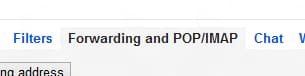
Step 3: Click Forwarding and POP/IMAP tab
Step 4: Then select Enable POP for all mail
Step 5: Scroll down the list When messages are accessed with POP and choose Archive Gmail’s copy. This way all emails which are downloaded to your computer or your USB drive will be automatically archived in Gmail.

Step 6: Now click the Save Changes button located at the bottom of the page
Step 7: Now we will configure a portable version of Thunderbird which we previously downloaded at the beginning of this tutorial. To do that start the Thunderboard by double clikcing on downloaded file
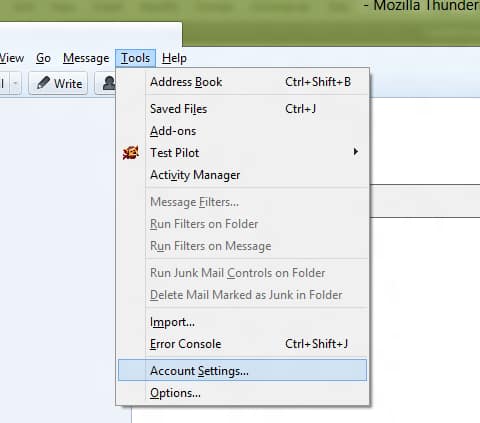
Step 8: In a window that appears click on click Tools and then from drop down menu select Account Settings
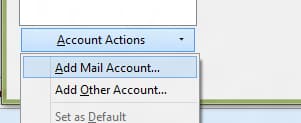
Step 9: Inside new window click on Account Actions and then Add Mail Account
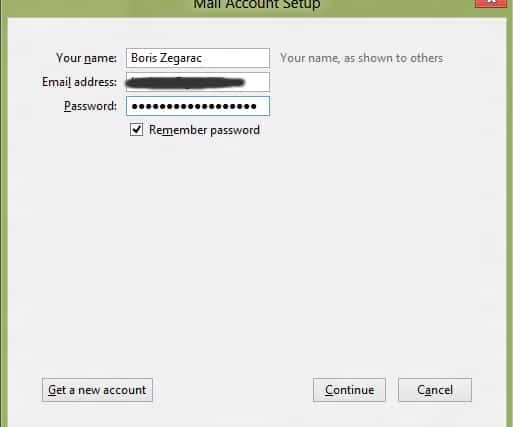
Step 10: Type in your email full name, email and password. Click Continue button
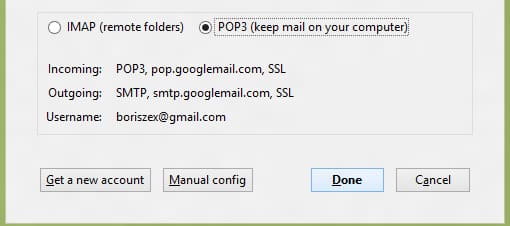
Step 11: Now select POP3 select box and click Done (Note that POP settings are automatically adjusted by Thunderbird)
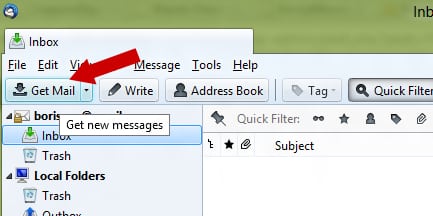
Step 12: Now when we have all configured lets download your emails. To do that simply click on Get Mail button located in top left corne of your Thunderbird window.
Step 13: If it ask you to enter a password type it in and then confirm. All your emails will be downlaoded now and original messages are stored online on Gmail under All Mail.
Depending on your net connection type and speed it might take some time if you have GBs of email in your mailbox. We hope this will help you having a copy of all your emails. Share your thoughts with us in comments below.
[ttjad keyword=”cloud-storage-drive”]

![Read more about the article [Tutorial] How To Opt Out Of Facebook’s Online and Offline Tracking](https://thetechjournal.com/wp-content/uploads/2012/10/fb-choice-as7d89a7sd987asd987as4d654.webp)
![Read more about the article [Tutorial] How To Compile Java Programs Through Windows Command Prompt](https://thetechjournal.com/wp-content/uploads/2012/10/windows-86-64-jdk-as5d4a56s4d65as4d21df.webp)
![Read more about the article [Tutorial] How To Transfer ePub eBooks To Your iPad](https://thetechjournal.com/wp-content/uploads/2012/11/epub-ipad-ttj-logo.webp)