
When you bought latest version of iPad the first thing you probably did is restoring a backup and transferring everything from your old iPad. If you already did that some of new features that iPad brings won’t be accessible to you because they will be turned off by default. One of them is Voice Dictation and in this tutorial I will show you how to enable it.

To get started follow steps below
Step 1: On your new iPad go to Settings, choose General section, scroll at the bottom of the page and tap on Keyboard
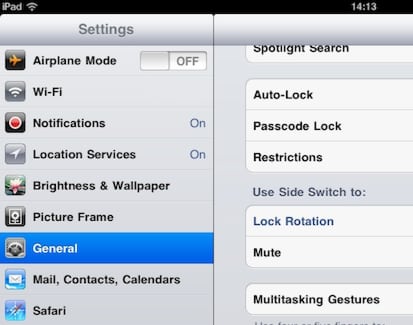
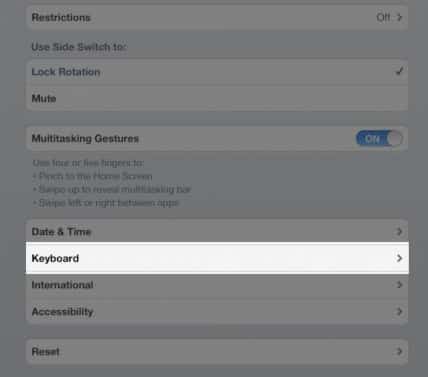
Step 2: In here at the bottom switch option Dictation from OFF to ON
Step 3: Next time, whenever a keyboard shows up on your new iPad you will have the option to dictate what you are typing. For that simply tap on microphone key and say what you want to type.

Step 4: Once you are finished tap on same microphone icon again and your words will be converted into text on your iPad screen
Step 5: If you iPad is not 100% sure about certain words you said he will underline those words with blue dotted line. When you tap on that word a small balloon window will show up with alternative suggestions.
You are done! We would love t hear your opinions about this new feature in iOS 5, so please share them in comment section below.
[ttjad keyword=”ipad”]

![Read more about the article [Tips] How To Perform Google Image Search With A Picture](https://thetechjournal.com/wp-content/uploads/2012/10/image-search-asd7987upoiu32113.jpg)
![Read more about the article [Tutorial] Manage File Compression More Easily With 7-zip In Windows](https://thetechjournal.com/wp-content/uploads/2012/05/7zip-logo.jpg)
![Read more about the article [Tutorial] How To Download Beautiful Bing Backgrounds As Your Wallpaper](https://thetechjournal.com/wp-content/uploads/2012/11/love-todays-bing-ass5d64a68r7ew897r.jpg)
I have ipad2 and is no such option like that :
You don’t have this option on your iPad 2 because it is only available on iPad 3 with latest iOS version. Make sure you read this article
http://thetechjournal.com/electronics/tablet/new-ipad-finally-unveiled-comes-with-retina-display-a5x-processor-better-camera.xhtml where you can find out more about new version of iPad and which new options you can expect when you buy it.
I don’t have it on my original iPad either. In fact just checked and its missing from my Newton. Rubbish eh.
i have ipad 3 (verified by model/serial number confirmation in addition to purchase info. During set up i responded “yes” to microphone option. when i go to Setting>General>keyboard per your instructions, i do not see a “dictation option.” any thoughts?
Restore your device then you will see the dictaction and without Internet you won’t see the dictaction.
Thanks!