
As most of the iOS users will be well aware, the much-anticipate and eagerly awaited Absinthe 2.0 tool is here, enabling iOS users to break free from the bounds placed on their devices by Apple. All you have to do is download Absinthe 2.0, install it and voila, you will be able to access a whole plethora of new apps and extensions on your iOS device. Given below is a simple tutorial to help you accomplish jailbreak using Absinthe 2.0, on Windows.

Before you begin with the jailbreak, be sure to restore and backup your data. While Absinthe 2.0 is quite secure and comes from some of the most intelligent minds in the iOS community, you never know what may go wrong and when. And so, rather than risking the loss of data, its better to have a backup pre-handedly.
You may check out the list of devices which are supported by Absinthe 2.0 to see if your particular iDevice is supported. Generally, Absinthe 2.0 supports nearly all A4 and A5 devices running iOS 5.1.1. Given below is a step by step tutorial to help you accomplish jailbreak using the tool on Windows.
Step 1: Download the latest version of Absinthe for Windows from here.
Step 2: Extract the downloaded archive.
Step 3: Go to the file that was just extracted and double click the file named absinthe-win-2.0.exe.
Step 4: When you click the file, it will create another folder named absinthe-win-2.0.
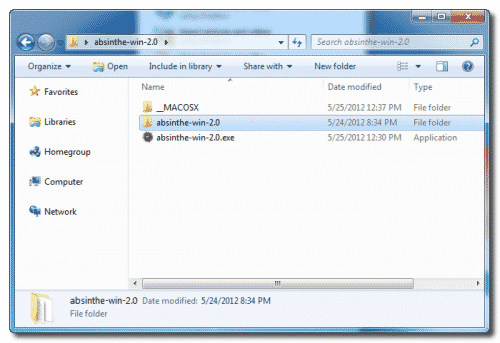
Step 5: Open this new folder and double click the file absinthe.exe
Step 6: This will launch the setup and you will be asked by the setup to plug in your iDevice to the computer through USB. You should make sure that there are no passcodes or VPN settings intact on your device before you plug it to the computer.
Step 7: Once you’ve plugged in the device, hit the jailbreak button on the window.
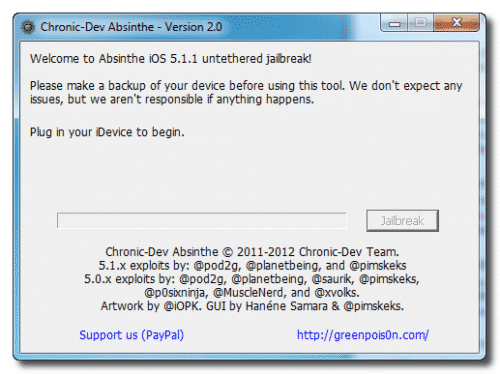
Step 8: This will initiate the process and the setup will automatically take you through a number of steps including initialization of jailbreak, sending initial jailbreak data, sending final data, waiting for reboot and completion of process.
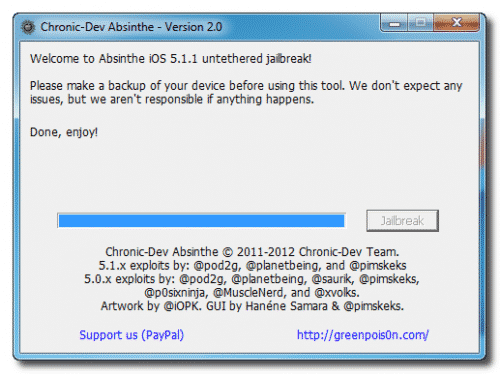
Step 9: Once the jailbreak completes, you will be told on the window that you are done. You should see a Cydia icon within few minute on your Springboard which will confirm the completion of the jailbreak.
[ttjad keyword=”iphone”]

![Read more about the article [Tutorial] Edit Your Facebook Look Back Movie](https://thetechjournal.com/wp-content/uploads/2014/02/Edit-button-On-Facebook-Look-Back.webp)
![Read more about the article [Tutorial] How To Update Samsung Galaxy Note To Android 4.0 Ice Cream Sandwich](https://thetechjournal.com/wp-content/uploads/2012/07/pda-odin-button.webp)
![Read more about the article [Tutorial] How To Easily Reduce Video File Size Before Uploading It To Web](https://thetechjournal.com/wp-content/uploads/2012/11/add-videos-as5d498e7r98y7u.webp)
As most of the iOS users will be well aware, the much-anticipate and
eagerly awaited
All you have to do is download Absinthe 2.0, install it and voila, you will be able to access a whole plethora of new appS.