
If for some reason you need to know and measure the distances on a map you can easily achieve that with an advanced feature of Google Maps and in this tutorial I will show you how quickly you assess the length. Google Maps lab offers a new feature to measure distances on a map. Define as many way point you want on a map to get the total distance of your route.

To get started we will need to activate the tool for measuring distances, for that follow steps below
Step 1: In your Web browser, go to Google Maps by going to the address http://maps.google.com/
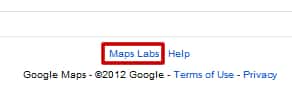
Step 2: At the bottom left of the page, click on Maps Labs.
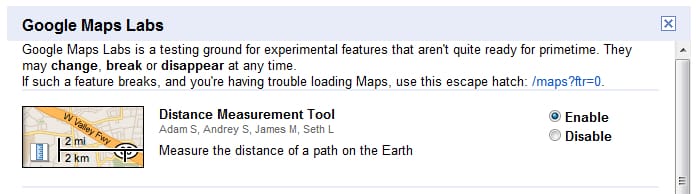
Step 3: Besides the Distance Measurement Tool (it should be first one), select Enable.
Step 4: Click the Save Changes button.
Step 5: Now when we have enabled Distance Measurement Tool, on the map go to the starting point for your measurements.
Step 6: Click the blue square representing a ruler next to the scale of the map.

Step 7: In the left pane, make sure that the Metric is selected.

Step 8: Point and click on the map location from which you want to start your measurements. A bubble with a green triangle appears on the card.
Step 9: Point and click on another location on the map.
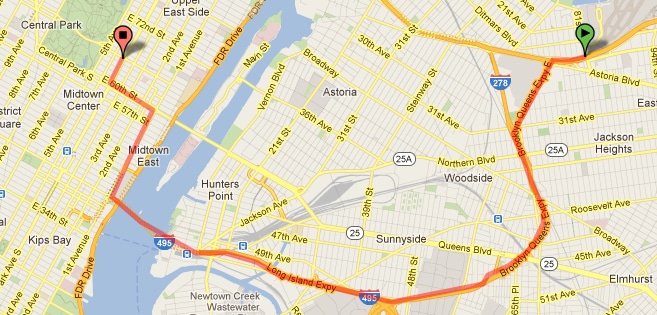
Step 10: The distance is displayed on the left pane.
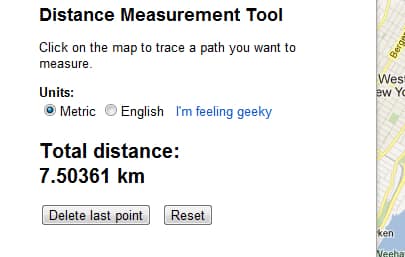
Step 11: Click as many times as necessary to measure complex routes, with intermediate stages for example.
Step 12: The total distance is displayed each time the left pane.
Step 13: You can go back several times by clicking the Delete button on the last point. Clicking the Reset button will reset your measurements.
Step 14: To hide measures on the map, click the ruler next to the ladder. Click again to redisplay the measures.
[ttjad keyword=”all-in-one-desktops”]

![Read more about the article [Tutorial] How To Set Up PDFs and Photos To Open in Windows 8 Desktop Programs](https://thetechjournal.com/wp-content/uploads/2012/11/open-with-as5d98s798s7f54f6s5df.webp)

![Read more about the article [Tutorial] How To Copy Xbox 360 Game To A Hard Drive](https://thetechjournal.com/wp-content/uploads/2012/04/xbox-console-hdd.webp)