
Few days ago I wrote a tutorial where I did show you how to enable restrictions in your iOS and secure your iDevices. But what if you forgot or lost your PIN/Password and you can disable any restrictions? Well don’t worry, in this tutorial I will show you how to recover your iOS restrictions PIN and if you want add new one. Note that this tutorial was performed on iPhone and I can’t guaranty that it will work on other iDevices.

For this method, it is not required that you iPhone be jailbreaked, however if you have configured your iTunes to encrypt your backups this method won’t work for you. If you have passed previous two requirements then you can proceed to below steps
Step 1: Download and install iPhone Backup Extractor on your Windows or Mac
Step 2: As soon as you lunch the application you iPhone backups will be detected with their dates. Under Select backup dropdown menu select the most recent backup and at the bottom of your window click on Expert mode to browse the backup

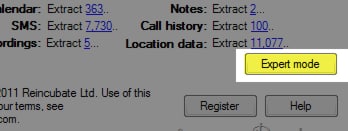
Step 3: From this location you have access to all .plist files saved in the backup which hold your iPhone settings, preferences including Restrictions PIN
Step 4: Now if you look at these lists you will see a lot of files, but you need to browse following one \Library\Preferences\com.apple.springboard.plist and make sure you check the box in front of com.apple.springboard.plist
Step 5: Click Extract selected and save it to desired location
Step 6: Now while you are still inside iPhone Backup Extractor window choose File and then from dropdown menu choose View PList
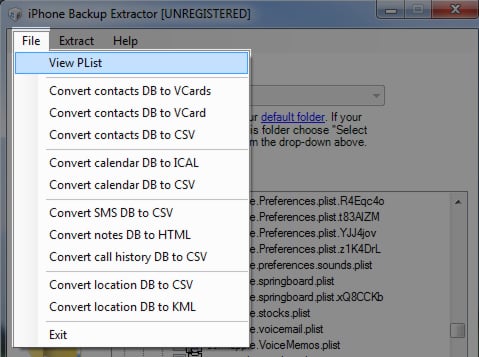
Step 7: Within open .plist file browse down to the following key SBParentalControlsPIN where you can view your saved Restrictions PIN.
[ttjad keyword=”iphone”]

![Read more about the article [Tutorial] How To Reduce Latency For Video Games](https://thetechjournal.com/wp-content/uploads/2012/05/latency-logo.webp)
![Read more about the article [Tutorial] How To Update Your WD MyBookLive Firmware](https://thetechjournal.com/wp-content/uploads/2012/10/update-firmware-as9d8df1321r65y4try1321i.webp)
![Read more about the article [Tutorial] How To Correct Your Spelling Errors In All Type Of Forms – Mozilla Firefox](https://thetechjournal.com/wp-content/uploads/2012/05/firefox-form-fields-options-change.webp)
mines not there….
Hi, unfortunately this does not work anymore it seems – I only see:
calendaralert-sound-identifier
texttone:Calendar Alert
newmail-sound-identifier
texttone:New Mail
reminderalert-sound-identifier
texttone:Reminder Alert
ringtone
<default>
sentmail-sound-identifier
texttone:Sent Mail
senttweet-sound-identifier
texttone:Sent Tweet
sms-sound-identifier
texttone:Tri-tone
voicemail-sound-identifier
texttone:Tri-tone
This doesn’t work with iOS5.1.1 🙁 Apple seem to have moved the location
Thanks!!! That worked like a charm!!!!!
This no longer works for ios 5.1+ The pin is now stored in the keychain-backup.plist file but it is encrypted.
Thanks!!!!! I have ios 4.0.1 and worked like a charm!!!! saved me lot of headache…..
com.apple.mobiletimer
com.apple.MobileAddressBook
com.apple.mobilenotes
com.apple.AdSheet
com.apple.AppStore
SBShowSMSPreview
True
SBParentalControlsPIN
0000
SBDidShowReorderText
True
SBShowBatteryPercentage
Hi this no longer works in ios 6.0 it seems iphone moved the restriction pin some were else please can some help mi.
SBAssistantGestureDescriptionShown
True
SBParentalControlsFailedAttempts
11
what does that mean can’t understand that
i cant find the Step 7: Within open .plist file browse down to the following key SBParentalControlsPIN where you can view your saved Restrictions PIN. i cant find the sbPArentalcontrolsPIN thing. Please fix this or find out a new way.