
website statistics

[Tutorial] How To Remotely Control Apple TV from Your iPad or iPhone

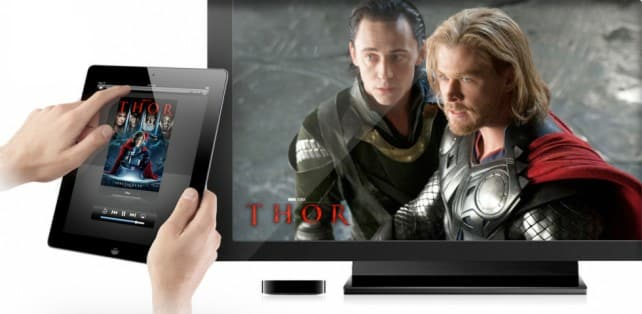
If you find the physical remote that comes with Apple TV too small then you should try using your iPad or iPhone as a remote controller. In this tutorial I will show you how to using Apple Remote app on your iDevice control Apple TV. The coolest Remote app features on your iPhone or iPad is to use an iPad keyboard when you need to type, much easier than using physical remote.
When do you use Facebook?

View Results

Loading ... Loading ...
1 Star2 Stars3 Stars4 Stars5 Stars (Rate This)
Loading ... Loading ...

If you find the physical remote that comes with Apple TV too small then you should try using your iPad or iPhone as a remote controller. In this tutorial I will show you how to using Apple Remote app on your iDevice control Apple TV. The coolest Remote app features on your iPhone or iPad is to use an iPad keyboard when you need to type, much easier than using physical remote.


Since I prefer to use it mostly on my iPad i will show you how to enable it under iPad however this procedure is almost the same on iPhone too. To get started follow steps below.

Step 1: For this purpose we will need to download Apple Remote app on our iDevice. This app is free, and once installation is finished lunch the Remote app and then tap on Turn on Home Sharing
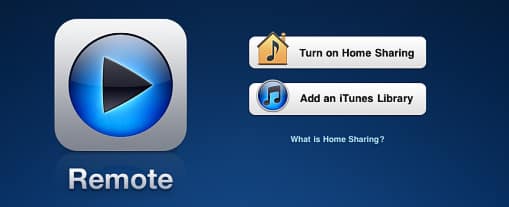
Step 2: Now enter your Apple ID and password and then tap Done

Step 3: You should see a message telling you to configure Apple TV with Home Sharing
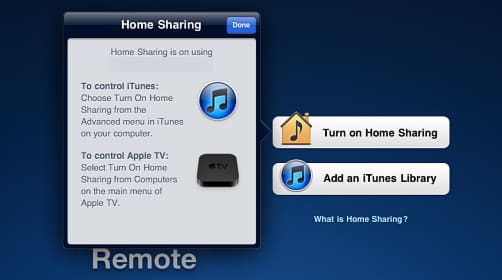
Step 4: Now on your Apple TV main menu go to Computers and then choose Turn on Home Sharing

Step 5: When we have successfully setup Home Sharing on our iDevice (In my case iPad) we are gone start using Remote app since all adjustments are done.

Step 6: Lunch Remote app on your iPad or iPhone and then you need to tap on big Apple TV icon
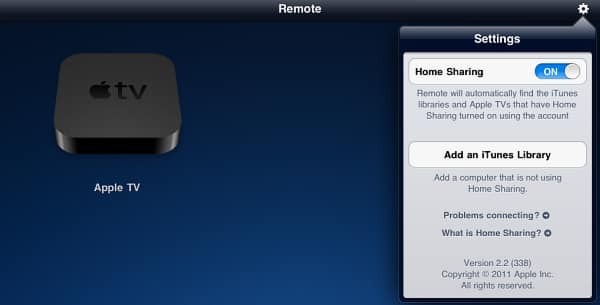
 

Step 7: Tap on Use gestures to control Apple TV

Step 8: Tap on Menu located at bottom of your screen to power on the Apple TV.

Step 9: Use finger gestures on your iDevice to navigate menus and control your Apple TV

You are finished now! Share your experience with us do you like this app or you prefer Apple TV physical remote.

Buy Cheapest Related Product From Amazon.com


Tobii Secures $21 Million In Investment From Intel

Wireless Industry Works On Making Wi-Fi Hot Spot Access Easier In The Coming Days
You can also press the left/right arrow key on your keyboard to go to previous/next post
  On March 21, 2012(1 year, 1 month ago.)

Recent Search

Recent Tutorials

This tutorial will show how to use S.M.A.R.T. (Self Monitoring Analysis and Reporting Technology) to continuously collect information on health of your equipment.
In this tutorial I'll show you how you can easily protect yourself from any kind of security breaks that may occur through Java.
Today Apple enabled "Two Step Verification" for iCloud And Apple ID. But the process is not that simple. But no worry, here we have made a step by step tutorial.
Cant remember your iPhone passcode? Here I will show you some workaround on what to do and how to recover and restore for every possible scenario.
This tutorial will show you how to perform the Winapp2.ini installation inside CCleaner and how to use it under Windows operating system.
With app called AD Sound Recorder, you can record any stream that passes through your sound card or speakers and in this tutorial I will show you how to do that.
If you want to have Boxee app inside your Apple TV, in this tutorial we will show you how to install XBMC and Boxee using Windows on your Apple TV.
This tutorial will show you how to transfer PS3 Saved Game Files from your PC to your PS3 game console.
Adding videos from external sources such as internet, more specifically from YouTube, is a great solution to enhance a presentation; in this tutorial I will show you the procedure.
If you are one of new comers to Windows Phone 8, like me, in this tutorial I will walk you through the process to update your Windows Phone 8 device.
Close You Have To Login
User:
Pass:
Login With »Login With TwitterLogin With Facebook