
If you own a Samsung SSD and you didn’t make any firmware updates since you bought it, then its time to do that. The firmware updates can bring up new features, but mainly these will be focused in fixing some existing bugs and optimizing your SSD performance. To update the firmware, we will be using Samsung’s Magician software package. This tutorial will walk you through the process.
Before proceeding to below steps, make sure you download and install Samsung Magician app on your computer from this link. Once you have this app up and running continue to the following steps.
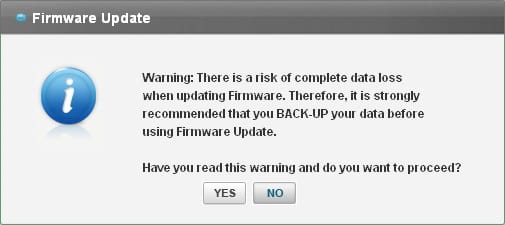
Step 1: First and most important thing is that you make a full or partial backup of your most important data from the SSD. Although not all firmware updates are destructive, some errors can happen that may result in lost or inaccessible data. Before performing firmware update Samsung Magician will also warn you to make a backup, so make sure you do that.
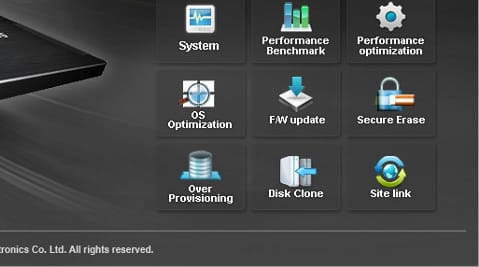
Step 2: Now launch Samsung Magician app from your desktop and when the application opens up click on F/W update button.
Step 3: Under Select Drive choose your SSD which is currently installed in the system. Then, under Browse the firmware update folder click Browse button, and select the folder where you have placed the latest firmware for your SSD (you can download latest firmware from this webpage).
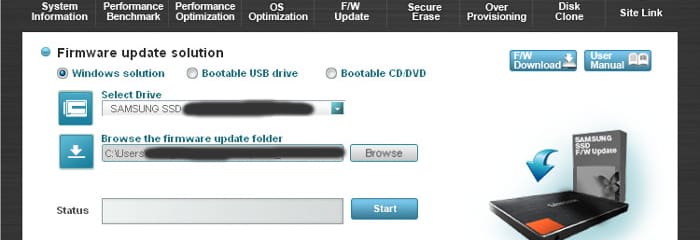
Step 4: Once all things is set up, click on Start button.
Step 5: Samsung SSD update process will start, and it will last between 5-10 minutes. You can also track the status from status bar located at the bottom of your screen.

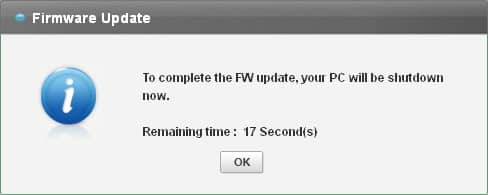
Step 6: Once the update is finished, you will receive a warning window that you have 20 seconds to turn off you system. If you have anything working in the background close it quickly and then click OK button. Your system will restart.
There you go! You have successfully updated your Samsung SSD with latest firmware version.
[ttjad keyword=”ssd”]

![Read more about the article [Tutorial] How To Change Default Music Player On Android](https://thetechjournal.com/wp-content/uploads/2015/01/CMP_1-432x768.png)
![Read more about the article Turn Windows Phone 7 into USB Drive[How To Guide]](https://thetechjournal.com/wp-content/uploads/2010/11/turn-windows-phone-7-usb-drive-300x222.jpg)
![Read more about the article [Tutorial] How To Send SMS From Your PC Through Your Android Device](https://thetechjournal.com/wp-content/uploads/2012/11/might-text-android-ttj-logo-512x196.jpg)
Hey! Nice tutorial, thanks! I have a question,I have installed the 250 GB samsung ssd 840 series in my laptop and have win7 and Ubuntu installed on it. Would I be able to perform de update even if the ssd is my boot drive? Thanks!!