website statistics

3D Version Of Google Earth Finally Unveiled By Google

When do you use Facebook?

View Results

Loading ... Loading ...
1 Star2 Stars3 Stars4 Stars5 Stars (Rate This)
Loading ... Loading ...

We have long been hearing that Google is working on a 3D version of its mapping service, Google Earth. And now, the search giant has finally unveiled a fully 3D version of Google Earth. While we will have to wait to finally use and see how awesome it is, the bit that has been unveiled by Google sounds very promising.
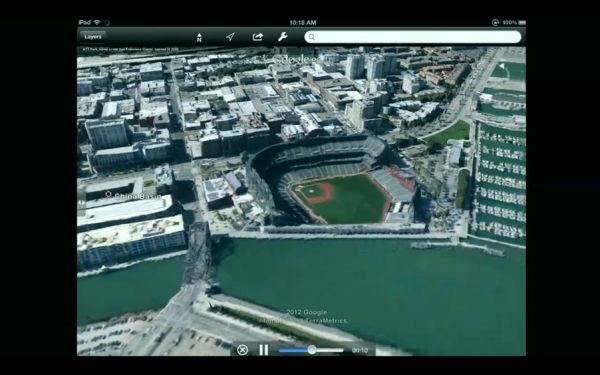

The 3D version of Google Earth is truly mesmerizing. It allows the users to navigate the maps by rotating, moving around and interacting with the 3D images. In a way, it seems very real. In the words of the product manager for Google Earth, Peter Birch, “We’re trying to create magic here. It creates the illusion you’re flying over the city.”

Although eventually, Google has plans of globally implementing the 3D version of its maps, for now, the aim of the company is to cover the locations of 300 million people by the end of 2012.

It seems that the company is investing heavily into compiling a 3D rendering of its maps. For this, Google is reportedly having images of cities taken from planes and then rendered into 3D images using automated technology. According to Birch, Google has been working on 3D maps for quite some time and had been wanting to ship out a 3D version of Google Earth but that so far, the quality of Google Earth hadn’t been high enough to allow this until now.

While there are some other smaller ventures trying to roll out 3D maps, none of them are so visually awesome as Google’s 3D Google Earth seems to be. For now, the service will be available on Android as well as iOS for a limited number of cities.

Source: The Verge

Buy Cheapest Related Product From Amazon.com


LinkedIn Finally Confirms Hacking Of Passwords Of Some Accounts

Rare Event Kicks Out Giant Black Hole From Its Home Galaxy
You can also press the left/right arrow key on your keyboard to go to previous/next post
  On June 7, 2012(11 months, 16 days ago.)

Recent Search

Recent Tutorials

This tutorial will show how to use S.M.A.R.T. (Self Monitoring Analysis and Reporting Technology) to continuously collect information on health of your equipment.
In this tutorial I'll show you how you can easily protect yourself from any kind of security breaks that may occur through Java.
Today Apple enabled "Two Step Verification" for iCloud And Apple ID. But the process is not that simple. But no worry, here we have made a step by step tutorial.
Cant remember your iPhone passcode? Here I will show you some workaround on what to do and how to recover and restore for every possible scenario.
This tutorial will show you how to perform the Winapp2.ini installation inside CCleaner and how to use it under Windows operating system.
With app called AD Sound Recorder, you can record any stream that passes through your sound card or speakers and in this tutorial I will show you how to do that.
If you want to have Boxee app inside your Apple TV, in this tutorial we will show you how to install XBMC and Boxee using Windows on your Apple TV.
This tutorial will show you how to transfer PS3 Saved Game Files from your PC to your PS3 game console.
Adding videos from external sources such as internet, more specifically from YouTube, is a great solution to enhance a presentation; in this tutorial I will show you the procedure.
If you are one of new comers to Windows Phone 8, like me, in this tutorial I will walk you through the process to update your Windows Phone 8 device.
Close You Have To Login
User:
Pass:
Login With »Login With TwitterLogin With Facebook