
Apple has removed the ability to rent TV shows from both iTunes and its Apple TV, taking away what was just last year one of the major advertised selling points of the $99 streaming-centric set-top box, introduced the ability to rent certain episodes of television programs for $0.99 each last September. Apple recently flipped the switch on streaming purchases for its relatively new second generation Apple TV and it appears 99-cent rentals didn’t move the needle, so we’ll wait and see what the folks from Cupertino have up their sleeve next……………
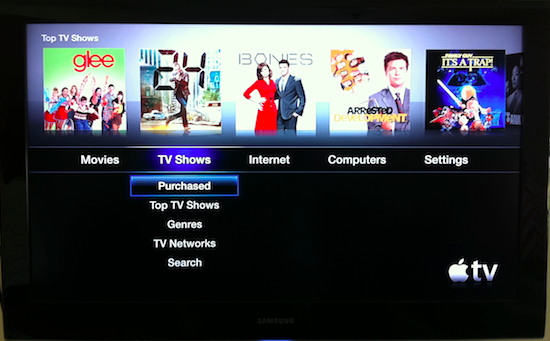
Apple pushed hard to get the TV networks to rent their shows at cut-rate pricing through its iTune store and Apple has completely removed customers’ ability to rent shows from iTunes; the remaining options are to buy individual episodes or in some cases a Season Pass for a year’s worth of shows. Apple has recently given customers the ability to watch shows they purchased via iTunes any time they want, on any Apple device by streaming it from its iTunes in the Cloud service. “iTunes customers have shown they overwhelmingly prefer buying TV shows,” Apple spokesman Tom Neumayr said. “iTunes in the Cloud lets customers download and watch their past TV purchases from their iOS devices, Apple TV, Mac or PC allowing them to enjoy their programming whenever and however they choose.” Former Apple CEO Steve Jobs and his lieutenants worked hard throughout 2010 to get studios on board with the idea of cutting their rental prices to spur more transactions. But in the end Apple was only able to get two major partners to sign up: Disney, where Jobs is on the board of directors and is the company’s largest individual shareholder and News Corp., which at the time was working closely with Apple to launch The Daily iPad newspaper.
Apple Chief Executive Steve Jobs showed off one more hobby with a newly redesigned Apple TV that costs less than half of the price of its predecessor- $99. The new Apple TV has a built-in power supply, HDMI, optical audio, Ethernet, and Wi-Fi, all packed into a device that is a quarter of the size of the previous generation hardware. The CEO said that the new Apple TV does away with concerns of storage, as it is based on a rental model rather than purchasing. Users can rent first-run HDTV movies for $4.99, while single episodes of TV shows in HD will be available for 99 cents from Fox and ABC. Users can also stream content from an iOS device running version 4.2 or later. Jobs demonstrated streaming the movie Up instantly from an iPad over Wi-Fi. The new Apple TV also offers access to Netflix streaming, YouTube videos and photos from Flickr. Content can also be streamed from a Mac or PC, and from a MobileMe account. The new Apple TV will ship later this month. “The new Apple TV, paired with the largest selection of online HD movie and TV show rentals, lets users watch Hollywood content on their HD TV whenever they want,” Jobs said in a press release. “This tiny, silent box costing just $99 lets users watch thousands of HD movies and TV shows, and makes all of their music, photos and videos effortlessly available on their home entertainment system.”
New Apple TV Features:
- Silent, cool, and small: The new Apple TV is quiet, energy efficient, and so small it fits just about anywhere.
- Less clutter with HDMI: Play audio and video though a single HDMI connection.
- Apple Remote included: Control Apple TV with the sleek, aluminum Apple Remote.
- Integration: Includes access to Netflix, Flickr, Rotten Tomatoes, and MobileMe.
- Photos, music and videos: View your own content on the new Apple TV. And stream content wirelessly via an iOS 4.2 or later device using the new AirPlay technology.
- Remote app for iPhone or iPod touch . Remote uses the same easy-to-use interface you already use to browse music and video on your Multi-Touch device. So right away, you know how to navigate. If you want to find something specific, use your device’s QWERTY keyboard to quickly tap out the title instead of clicking letters on the Apple TV screen.
Technical Specifications
Size and weight:
- Height: 0.9 inches (23 mm)
- Width: 3.9 inches (98 mm)
- Depth: 3.9 inches (98 mm)
- Weight: 0.6 pounds
In the box:
- Apple TV
- Aluminum Apple Remote
- Power cord
- Documentation
Environmental Status Report:
- BFR-free
- PVC-free (internal cables and components)
- Meets ENERGY STAR Version 2.0 requirements for set-top boxes
Processor: Apple A4 chip
System requirements:
- AirPort Extreme, Wi-Fi 802.11b, g, or n wireless network (wireless video streaming requires 802.11g or 802.11n) or 10/100BASE-T Ethernet network
- iTunes Store account for renting movies and TV shows
- Netflix account for streaming Netflix content
- For streaming media from a Mac or PC: iTunes 10 or later; iTunes Store account for Home Sharing
Ports and interfaces:
- HDMI2
- Optical audio
- 10/100BASE-T Ethernet
- Built-in IR receiver
- Micro-USB (for service and support)
Environmental requirements:
- Operating temperature: 32° to 95° F (0° to 35° C)
- Storage temperature: -4° to 113° F (-20° to 45° C)
- Relative humidity: 5% to 95% noncondensing
- Maximum operating altitude: 10,000 feet (3000 m)
Power: Built-in 6-watt universal power supply
Wireless: 802.11n Wi-Fi (a/b/g compatible), 2.4GHz and 5GHz
[ttjad keyword=”ipad”]


