
If you use Windows 7 on your laptop you probably notice that every time when you laptop have lower than 5% of energy left you receive a warnings message and your laptop goes into sleep mode. This can be very useful because it will because he will save current work, but in most cases that 5% converted in time is around 15 minutes, still enough of time for you to finish certain project you are working on and turn off your laptop manually. In this tutorial I will show you how to disable this 5% low battery warning with just few changes inside your Windows 7 Control Panel.
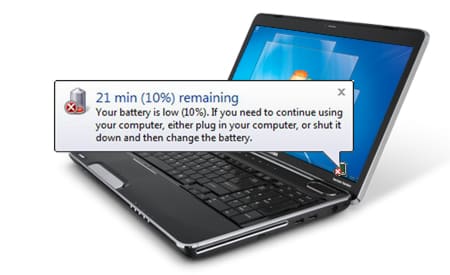
To get started follow steps below
Step 1: First thing what we need to do is check in what power saving mode your laptop is working. To do that click Start menu and then chose Control Panel
Step 2: Choose Category view and then click on System and Security
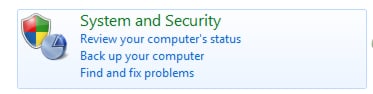
Step 3: Now choose Power Options and in new window select Change plan settings for the power plan you want to change

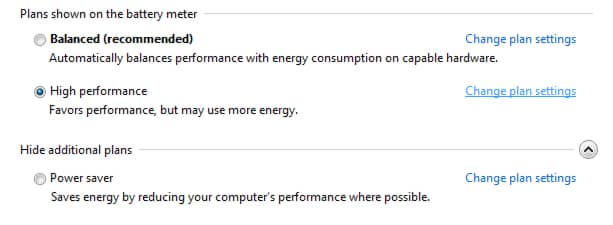
Step 4: In my case I choose High performance plan and when new window appear choose Change advanced power settings
Step 5: In small window that opens you will see an expandable menus and this is where you can change settings for different parts of your Windows 7 operating system and hardware for your power plan
Step 6: In our case we will expand Battery -> Critical Battery Level
Step 7: To disable 5% warnings message simply replace 5% with 0%.
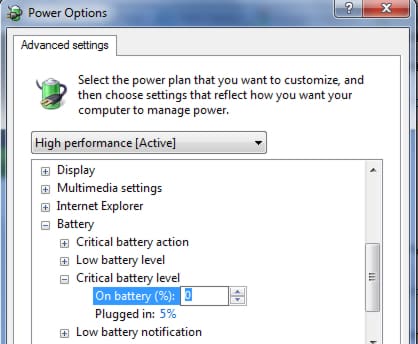
Step 8: Now simply save all changes by clicking OK and repeat above steps for all power saving modes you want.
[ttjad keyword=”laptop-lenovo”]

![Read more about the article [Tutorial] How To Install and Use Winapp2.ini In Windows](https://thetechjournal.com/wp-content/uploads/2013/02/ccleaner-winapp-ttj-logo.webp)
![Read more about the article [Tutorial] How To Compress PowerPoint File And Make It Smaller](https://thetechjournal.com/wp-content/uploads/2012/02/power-point-file-size-reduce.webp)
![Read more about the article [Tutorial] How To Search In All New iOS 7](https://thetechjournal.com/wp-content/uploads/2013/09/Photo-Sep-19-2-46-10-AM.webp)