website statistics

Fujitsu LifeBook PH520

When do you use Facebook?

View Results

Loading ... Loading ...
1 Star2 Stars3 Stars4 Stars5 Stars (Rate This)
Loading ... Loading ...

The Fujitsu LifeBook PH520 is a thin and light 11.6 inch notebook with an AMD processor. And like most Fujitsu notebooks, it’s a bit pricier than the competition……
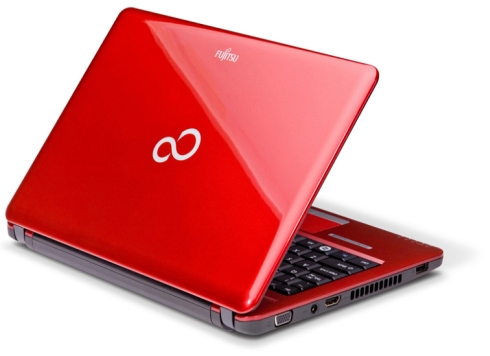
This netbook comes with a very eye-catching red paintjob. No one will surely miss it on the store shelf! Aside from its very attractive casing, the LifeBook PH520 also features an 82-key keyboard that’s fully spill-resistant. For sure this is great news for those clumsy people out there.

Japanese computer manufacturer, Fujitsu is out with one more netbook in its LifeBook series. The new Fujitsu LifeBook PH520 is now available in the US and comes in some attractive colors. Users get a 11.6″ display packed with 1366×768 pixels running on a 1.7GHz AMD Athlon II Neo K125 processor. That’s not blazingly fast, but is still very competitive.
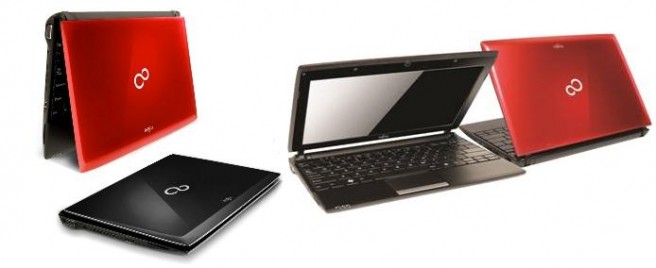
The new Fujitsu LifeBook PH520 is now available to U.S. customers with it’s bright Red case. The 3.08 pound 11.6″ ultra-portable features the latest AMD processor for ultra-thins the Athlon II Neo K125 1.7GHz processor. The laptop comes with Windows 7 Professional and Office Starter 2010 all pre-loaded. Inside the laptop you will find the Athlon processor, 2GB of RAM, a 320GB hard drive, Mobility Radeon HD 4225 integrated graphics, a 1.3 megapixel webcam, LAN, 802.11 b/g/n Wi-Fi, Bluetooth, and a 6-cell battery (for up to 6.2 hours of operation).
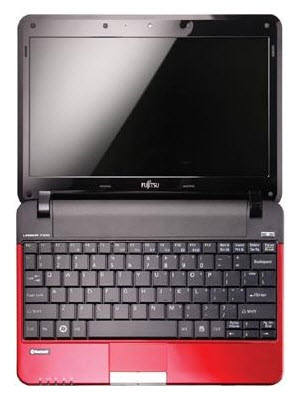
Still, if you’re a sucker for Fujitsu branding, here’s what you get for the money:

  • CPU: 1.7GHz AMD Athlon II Neo K125.
  • Display: 11.6″ 1366 x 768 pixel.
  • OS: Window 7 Professional.
  • Memory: 2G DDR3.
  • Storage: 320GB hard drive.
  • Connectivity: 802.11b/g/n WiFi, Ethernet, Bluetooth.
  • I/O: HDMI, 3 USB ports, flash card reader.
  • Battery: 5800 mAh.
  • Other: spill-resistent keyboard.
  • Price: $599.

Resources :liliputing.com,netbook-planet.com

Freedom Fighters

Samsung A130 for South Korea
You can also press the left/right arrow key on your keyboard to go to previous/next post
  On July 5, 2010(2 years, 10 months ago.)

Recent Search

Recent Tutorials

This tutorial will show how to use S.M.A.R.T. (Self Monitoring Analysis and Reporting Technology) to continuously collect information on health of your equipment.
In this tutorial I'll show you how you can easily protect yourself from any kind of security breaks that may occur through Java.
Today Apple enabled "Two Step Verification" for iCloud And Apple ID. But the process is not that simple. But no worry, here we have made a step by step tutorial.
Cant remember your iPhone passcode? Here I will show you some workaround on what to do and how to recover and restore for every possible scenario.
This tutorial will show you how to perform the Winapp2.ini installation inside CCleaner and how to use it under Windows operating system.
With app called AD Sound Recorder, you can record any stream that passes through your sound card or speakers and in this tutorial I will show you how to do that.
If you want to have Boxee app inside your Apple TV, in this tutorial we will show you how to install XBMC and Boxee using Windows on your Apple TV.
This tutorial will show you how to transfer PS3 Saved Game Files from your PC to your PS3 game console.
Adding videos from external sources such as internet, more specifically from YouTube, is a great solution to enhance a presentation; in this tutorial I will show you the procedure.
If you are one of new comers to Windows Phone 8, like me, in this tutorial I will walk you through the process to update your Windows Phone 8 device.
Close You Have To Login
User:
Pass:
Login With »Login With TwitterLogin With Facebook