
Are there some people that irritates your and keep calling over and over again, even if you told them not to? If you have this kind of problem and you are using Android smart phone you can easily block all incoming calls from those people and in this tutorial I will show you how to do that.
Depending on which type of Android smart phone you are using there are two possible methods to block calls from certain people on Android smart phones. First one is to use built in blocking tool while second one involves a third party app for android. I will cover both methods in case your phone does not support first one.
This tutorial is performed in Samsung Galaxy Note and us running under Ice Cream Sandwich 4.0.3. TO get started follow steps below
First Method
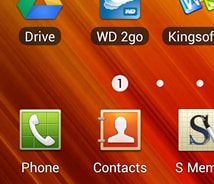
Step 1: Go to your Contacts list and choose a person which you want to block
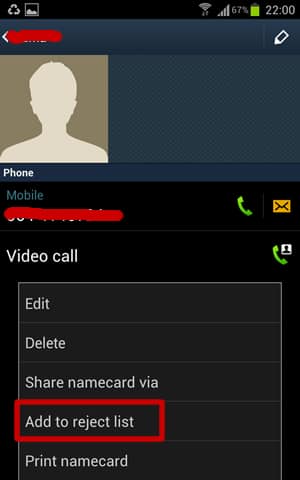
Step 2: Bring up the menu and then choose Add to reject list.
Step 3: This person will now be block and you should see a blue stop mark next to caller phone number.
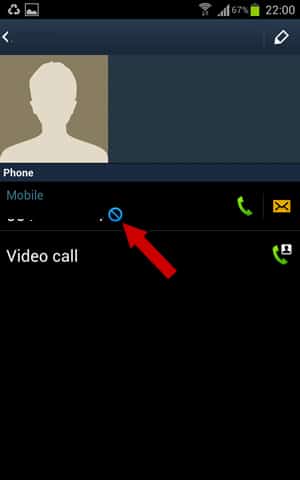
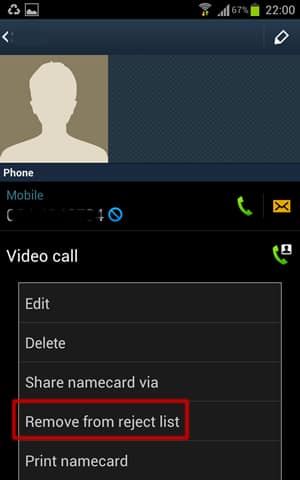
Step 3: To remove your contact from block list, go to his profile, bring up options menu again and choose Remove from reject list
Second Method
Now if you Android smart phone does not support above option you can use some third party app which will help you to easily manage your blocked contacts. Here is what you need to do
Step 1: Go to Google Play, download Call Control app and install it on your Android phone. You can find that app at this link
Step 2: Once the app is successfully installed, start the app and accept the terms of use.
Step 3: Now from app home screen choose Recent calls
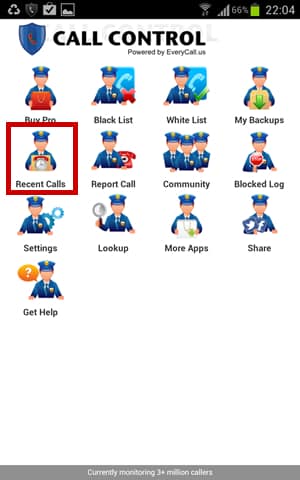
Step 4: Choose the number you wish to block and tap on Add to Black List

Step 5: It is also possible to add contacts to block list by choosing Black List option from app home screen

Step 6: Then tap on + sign located at the bottom left
Step 6: Now choose Contact number and pick the phone number from your contact list which you wish to block
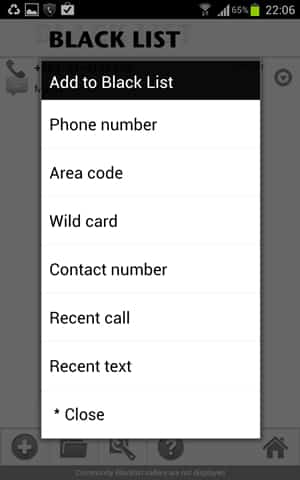
Step 7: To remove a contact from app black list go to Black List menu and tap on down arrow.
Step 8: Choose Remove and your contact will be removed from block list.
You are done. If first suggestion worked on your phone please let comment in section below letting other users know on which phone it did work and on which one it didn’t.
Follow us on Twitter or be a Fan on Facebook or Subscribe On our News Feed for free to get regular update.
[ttjad keyword=”android-phone”]

![Read more about the article [Tutorial] How To Jailbreak Your iPad on iOS 5.1.1 Using Absinthe 2.0 – Windows](https://thetechjournal.com/wp-content/uploads/2013/01/Using-Absinthe-2.0-1.jpg)
![Read more about the article [Tutorial] How To Add Windows 7 Client PC to Windows Home Server](https://thetechjournal.com/wp-content/uploads/2012/03/windows-home-server-logo1-512x210.jpg)
![Read more about the article [Tutorial] How To Send Contacts From One iPhone To Another](https://thetechjournal.com/wp-content/uploads/2012/03/iphone-contacts-share.jpg)