
website statistics

[Tutorial] How To Change Windows 8 Lock Screen Background Image And Apps

If you got tired of seeing the same image on your Windows 8 Lock screen over and over again, then in this tutorial I will show you how easily you can add any other background you wish on your Lock screen, but also how to add additional apps which will keep you updated about current whether, latest messages and emails, etc...

When do you use Facebook?

View Results

Loading ... Loading ...
1 Star2 Stars3 Stars4 Stars5 Stars (Rated: 3.00/5)
Loading ... Loading ...

If you got tired of seeing the same image on your Windows 8 Lock screen over and over again, then in this tutorial I will show you how easily you can add any other background you wish on your Lock screen, but also how to add additional apps which will keep you updated about current whether, latest messages and emails, etc…

To get started follow steps below

Step 1: Bring up the Charm menu by pressing Win+C on your keyboard.

Step 2: From Charm menu bottom right corner click on Settings.

Step 3: Now from bottom right corner of your screen click on Change PC Settings.
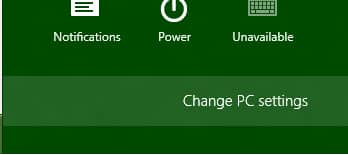
Step 4: From left pane select Personalize.
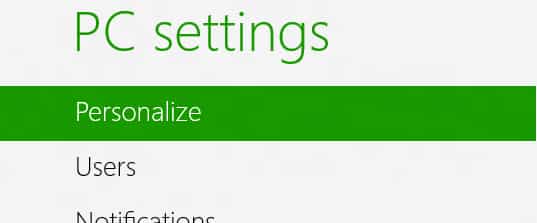
Step 5: Then from right pane select Lock screen tab if it’s not already selected.
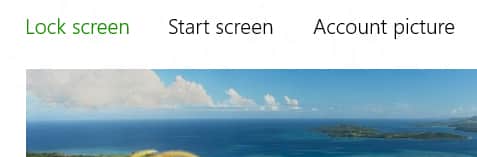
Step 6: Click Browse button and then locate your new image which you want to use for your Lock Screen background and click Open.
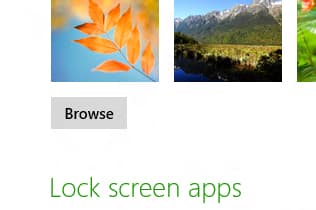
Step 7: If you wish to select a default or previously used image simply press on one of offered thumbnails located right above Browse button.

Step 8: Another great thing about Lock Screen is that you can customize which apps will be running in the background and show some important data on your Lock Screen. For that scroll down to Lock screen apps section and choose the apps you want to have in your Lock screen.
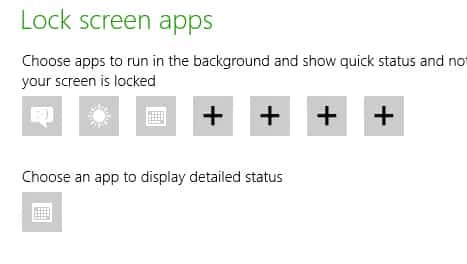
Step 9: By default you have Messaging, Mail, Calendar apps, if you wish to add a new one simply click on + and choose which app you want to add.


[Tutorial] How To Replace Predictions By Punctuation Marks In The Android Jelly Bean Keyboard

Decide.Com Launches Decide Score – Helps Users Decide What And When To Buy
You can also press the left/right arrow key on your keyboard to go to previous/next post
  On August 3, 2012(9 months, 25 days ago.)

Recent Products

Buy Now | Compare  
Buy Now | Compare  
Compare  
  • sm

    i tried to change my lock screen etc, but they are greyed out and i cannot access them. ideas?

  • Mike

    I have the same problem. I set the options to Enable via gpedit.msc but they’re still greyed out. What’s the deal??


Recent Search

Recent Tutorials

This tutorial will show how to use S.M.A.R.T. (Self Monitoring Analysis and Reporting Technology) to continuously collect information on health of your equipment.
In this tutorial I'll show you how you can easily protect yourself from any kind of security breaks that may occur through Java.
Today Apple enabled "Two Step Verification" for iCloud And Apple ID. But the process is not that simple. But no worry, here we have made a step by step tutorial.
Cant remember your iPhone passcode? Here I will show you some workaround on what to do and how to recover and restore for every possible scenario.
This tutorial will show you how to perform the Winapp2.ini installation inside CCleaner and how to use it under Windows operating system.
With app called AD Sound Recorder, you can record any stream that passes through your sound card or speakers and in this tutorial I will show you how to do that.
If you want to have Boxee app inside your Apple TV, in this tutorial we will show you how to install XBMC and Boxee using Windows on your Apple TV.
This tutorial will show you how to transfer PS3 Saved Game Files from your PC to your PS3 game console.
Adding videos from external sources such as internet, more specifically from YouTube, is a great solution to enhance a presentation; in this tutorial I will show you the procedure.
If you are one of new comers to Windows Phone 8, like me, in this tutorial I will walk you through the process to update your Windows Phone 8 device.
Close You Have To Login
User:
Pass:
Login With »Login With TwitterLogin With Facebook