We often talk about how the growth of internet is explosive and how soon the whole world will be hooked to this medium. But words can not procure it as effectively as this infographic by Intel does. According to the infographic, netizens make some 2 million Google searches and 100,000 tweets every minute!
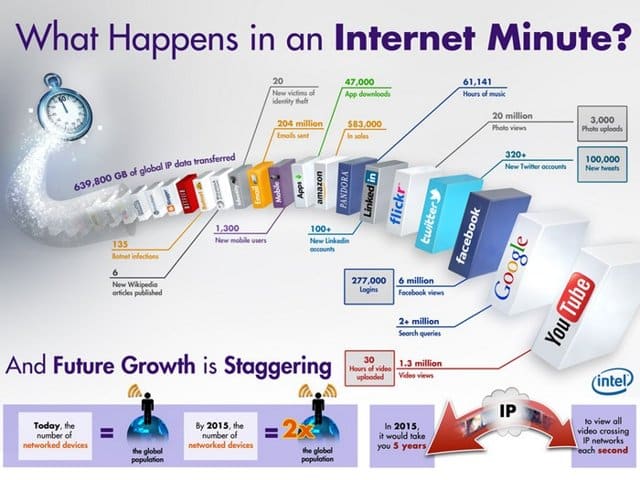
And that’s literally just the tip of the iceberg. Even with millions of people tooling a smartphone, it is indeed surprising that 47,000 apps are downloaded each minute. Moreover, the power of the open-source is also well manifest in the fact that every single minute, 6 new Wikipedia articles are published – guess we never will be able to read that encyclopaedia in its entirety.
Facebook takes the lead when it comes to the social media front. Every minute, 277,000 logins are made to the social network with 6 million views. 30 hours of video are uploaded to YouTube and 1.3 million views pour in within that minute. Twitter is close on the heels of Facebook with its 100,000 tweets and 320 new Twitter accounts per minute.
Of course with so many users, the possibilities for the crooked also increase substantially. So, in every minute, 20 users fall victim to phishing while 135 botnet infections occur. But Amazon tops most of these by making $83,000 in sales in a single minute!
The overall number of networked devices, as per the infographic, is roughly equal to the world’s population. And just by 2015, which seems pretty much around the corner, the world will have twice as many networked devices as the population! And here we were worrying about the human population.
Finally, a mind-blowing amount of 639,800 GB of data is globally transferred online each minute. Views on Flicker are also incredible with 20 million photos viewed on it and some 3000 upload in these sixty seconds. All these statistics manifest how incredibly explosive the growth of the web is. And we can stay sure that this will continue unabated.
Follow us on Twitter or be a Fan on Facebook or Subscribe On our News Feed for free to get regular update.
[ttjad]

![Read more about the article [Infographic] Just How Big Is Apple?](https://thetechjournal.com/wp-content/uploads/2012/05/appleinfo-126x768.jpg)
![Read more about the article [Infographics] Impatient Americans – Why Website Needs To Be Fast](https://thetechjournal.com/wp-content/uploads/2012/03/Instant-USA-512x411.jpg)