website statistics

Fujifilm Hopes To Introduce 1TB Optical Disc In 2015

FujiFilm has discovered a new recording method for optical discs. Now the company hopes that it will be able to introduce 1TB optical discs in 2015.

When do you use Facebook?

View Results

Loading ... Loading ...
1 Star2 Stars3 Stars4 Stars5 Stars (Rate This)
Loading ... Loading ...

Till now, we have seen optical discs as large as 50Gb. But, with the ongoing trend in the multimedia encoding this capacity won’t be enough in future. Consider that, FujiFilm has been working on increasing the capacity of optical discs. Through discovering a new recording method for optical discs, the company hopes to introduce 1TB optical discs in 2015.

Fujifilm logo

Fujifilm has developed the new recording method for optical discs by using two-photon absorption technique to generate heat. The two-photon absorption can be limited to the small area of the focal point of a laser light. So, it is possible to increase the number of recording layers on optical discs. This method is capable of realizing a recording density of 25 Gbytes per layer, which is equivalent to the recording density of blu-ray discs. According to the calculation of Fujifilm, this new method would allow them to increase the recording layers up to 20 on each side of a disc. FujiFilm believes it is theoretically possible to make a double-sided optical disc with a 1TB storage capacity and the new recording method has a potential to realize a 15-TB disc in the future, and at a cost as low as a magnetic tape.
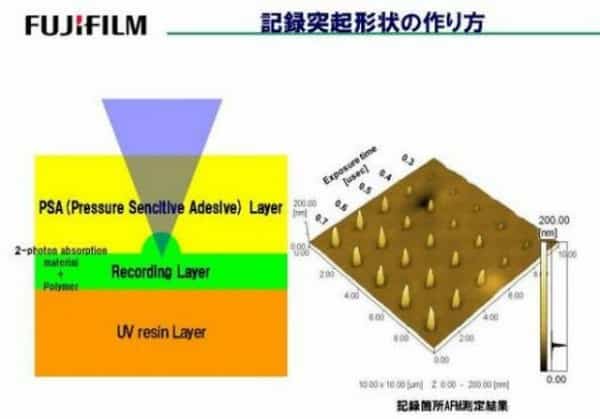
Structure Of The Two-photon Absorption Material And The Variation Of The Convex Shape

FujiFilm said, “It takes 147 seconds to form a four-layer BD (Blu-ray Disc). With our method, it takes only 58 seconds to form eight layers. In the future, it will be possible to realize a 15-Tbyte optical disc (25 Gbytes/layer x 3 (eight values) x 100 layers x 2 (two sides).”

Fujifilm mentioned that the cost of manufacturing of this new disc will be cheaper than blu-ray discs. FujiFilm hopes they’ll be able to deliver a 1TB optical disc to the consumer market by 2015, with a possibility of a 15TB disc on the horizon. You can view the paper that FujiFilm released on its research, along with some of the more technical aspects to the method to which they propose the introduction of a 1TB (and possible 15TB) optical disc below.

Thanks To : PsyOrg

Buy Cheapest Related Product From Amazon.com


[Tutorial] How To Enable Spotify’s New Web Player

More Information Of Xbox 720 Revealed
You can also press the left/right arrow key on your keyboard to go to previous/next post
  On November 19, 2012(6 months, 5 days ago.)

Recent Search

Recent Tutorials

This tutorial will show how to use S.M.A.R.T. (Self Monitoring Analysis and Reporting Technology) to continuously collect information on health of your equipment.
In this tutorial I'll show you how you can easily protect yourself from any kind of security breaks that may occur through Java.
Today Apple enabled "Two Step Verification" for iCloud And Apple ID. But the process is not that simple. But no worry, here we have made a step by step tutorial.
Cant remember your iPhone passcode? Here I will show you some workaround on what to do and how to recover and restore for every possible scenario.
This tutorial will show you how to perform the Winapp2.ini installation inside CCleaner and how to use it under Windows operating system.
With app called AD Sound Recorder, you can record any stream that passes through your sound card or speakers and in this tutorial I will show you how to do that.
If you want to have Boxee app inside your Apple TV, in this tutorial we will show you how to install XBMC and Boxee using Windows on your Apple TV.
This tutorial will show you how to transfer PS3 Saved Game Files from your PC to your PS3 game console.
Adding videos from external sources such as internet, more specifically from YouTube, is a great solution to enhance a presentation; in this tutorial I will show you the procedure.
If you are one of new comers to Windows Phone 8, like me, in this tutorial I will walk you through the process to update your Windows Phone 8 device.
Close You Have To Login
User:
Pass:
Login With »Login With TwitterLogin With Facebook