
You have an Android smartphone and 3G package to access the Internet from your mobile? You can easily share and enjoy your connection and your Internet access with all your other WiFi devices without having to purchase packages for each of them. The Wireless Access Point functionality found on Android phones makes it possible to share the 3G connection of your phone with other devices that have Wi-Fi. This can be a laptop, a tablet or other mobile phone for example. To use this function, it is of course necessary to have a 3G package that allows access to the Internet by sending and receiving data on your phone. To avoid surprises, I recommend a package that is not limited in the amount of data exchanged.

Sharing the Internet connection from your mobile phone remains a significant additional solution when you do not have access to the Internet around you. Follow below steps to get started
Enable wireless access point in your Android phone
Step 1: On your Android phone, go to Settings
Step 2: Now choose Wireless and networks.
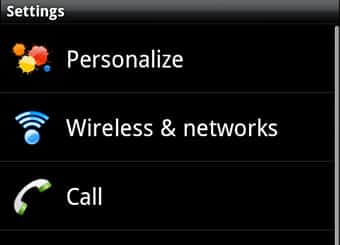
Step 3: Go to the section Access point settings.
Step 4: Inside field Router name (SSID), give a name to identify the access point that you create (no accents or special characters)
Step 5: Scroll down the list to Security and select option WPA2 (AES) to encrypt the exchange between your devices and the access point.
Step 6: In the Password field, enter a complex password that will be required to use the Internet connection on your phone.
Step 7: Go back to the section Wireless and networks.
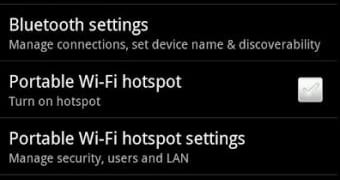
Step 8: Now simply check the box next to Portable Wi-Fi Hotspot to activate your access point
Connect to access point
Now that your phone acts as a gateway to the Internet, you will be able to connect to it via Wi-Fi from your laptop, tablet or other phone, and enjoy your Internet connection .
Step 1: On your computer, tablet or phone, look for available WiFi connections.
Step 2: Select your access point.
Step 3: Click Connect.

Step 4: Enter the password that you set on the access point and confirm
Step 5: The connection to the Internet via the access point on your Android phone is established.
Step 6: On your phone, access point Wi-Fi is active.
Step 7: You can now browse the Internet on your computer or tablet by connecting on your smartphone.
[ttjad keyword=”t-mobile-contract-phone”]


![Read more about the article [Tutorial] How To Enable 720p Video Recording On The Nexus 7](https://thetechjournal.com/wp-content/uploads/2013/01/nexus-7-720p-camera-ttj-logo.webp)
![Read more about the article [Tutorial] How To Unlock Android 4.2 Daydream Feature Called BeanFlinger](https://thetechjournal.com/wp-content/uploads/2012/11/about-phone-as5d498e7rw.webp)
This is great thanks
Not able to access internet on ipad from my 3g enabled cell even after doing these settings.
That is fine. I could do it, but could not get ti done with ubuntu. Can you help
This piece of writing will help the internet visitors for creating new web site or even a blog from start to end.
Hello my family member! I want to say that this post is amazing, great written and come with almost all significant infos. I would like to look more posts like this .
Pretty great post. I just stumbled upon your weblog and wanted to say that I have really loved browsing your weblog posts. After all I’ll be subscribing on your feed and I hope you write once more very soon!
I have figured out some new things from your web page about pcs. Another thing I have always imagined is that laptop computers have become a specific thing that each house must have for many reasons. They provide convenient ways in which to organize the home, pay bills, go shopping, study, pay attention to music as well as watch tv shows. An innovative solution to complete most of these tasks is by using a notebook computer. These computers are mobile ones, small, strong and easily transportable.
Thanks for discussing your ideas in this article. The other issue is that any time a problem takes place with a computer motherboard, people today should not have some risk regarding repairing the item themselves because if it is not done right it can lead to permanent damage to the whole laptop. It is almost always safe to approach your dealer of your laptop for the repair of its motherboard. They’ve got technicians who may have an expertise in dealing with pc motherboard issues and can make right diagnosis and undertake repairs.
I have taken note that of all varieties of insurance, medical insurance is the most dubious because of the issue between the insurance policy company’s duty to remain profitable and the client’s need to have insurance plan. Insurance companies’ commission rates on health and fitness plans have become low, so some corporations struggle to make a profit. Thanks for the tips you write about through this site.
I am glad for commenting to make you be aware of of the fine encounter my wife’s princess encountered reading yuor web blog. She figured out numerous things, not to mention how it is like to possess an incredible teaching nature to have other individuals easily fully understand several problematic issues. You undoubtedly exceeded my desires. Many thanks for supplying those necessary, healthy, edifying not to mention fun guidance on your topic to Emily.