How To Transfer File From iPhone to Mac

You can store any type of file in iCloud Drive, as long as it’s 50GB or less in size and you don’t exceed your iCloud storage limit. And for on the fly file sharing you can use AirDrop.
iOS comes with built-in Screen-Recording feature. Whereas on Android you need to use a third-party app or the native Google Play Games App.
AirPrint for iOS and Google Cloud Print for Android lets you print files over your Wi-Fi Network.
It can take anywhere between one hour to 2 days to receive a mail with all your Instagram Data
Once a new upgrade to Smartphone arrives there is no point of keep on using the old version. But transition to a new smartphone is not that easy, simply because you have tons of data on your old phone that you need to somehow transfer to the new one.
With AirDrop, you can wirelessly send documents, photos, videos, websites, map locations, and more to a nearby iPhone, iPad, iPod touch, or Mac.
If you have setup a hard password for your WiFi network, chances are at one point you might forget it. You might think writing it down might be a good idea. But it isn’t. This is where the need and utility of a QR Code to connect to WiFi emerges.
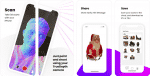
Want to capture the world in more than just 2 dimensions? Try 3D scanning anything or anyone with Capture, the fastest and most accurate iPhone scanning app available!