
If you have recently connected to certain Wi-Fi Network and you can’t remember which password you did used for that connection, in this tutorial I will show you which steps you need to perform in your Mac OS X and see which password you need to use. You won’t need any third party tools for this procedure because Mac OS X have integrated tool for this procedure.

To get started follow steps below
Step 1: On your Mac go to Applications and choose Utilities folder
Step 2: Inside Utilities folder you will find the application called Keychain Access.app. Open that application

Step 3: From Keychain Access left top side of window select login

Step 4: Now use a search field from top right corner of window and type AirPort. This will help us to easier locate the logins related to your AirPort wireless card

Step 5: You will probably see a lot of results but you will need to locate and then double click on the wireless network from which you want to retrieve the login password
Step 6: A new window will open with Attributes of that Wi-Fi Network. From this window check the field Show password
Step 7: Enter your password and confirm by pressing on OK
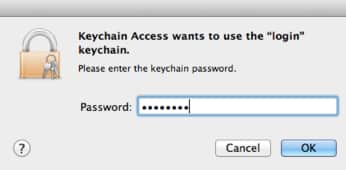
Step 8: Retype the same password again and click Allow
Step 9: When you return to you’re to window to previously open in Step 6 you will see a password written in last input field. That’s the password you were looking for.
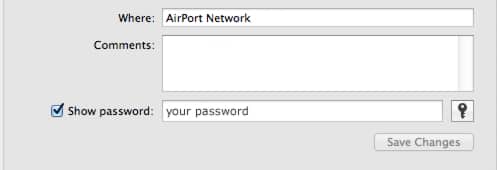
There you go! You can repeat above steps for any other Wi-Fi Network you want to connect to but you can remember which password it was.
Follow us on Twitter or be a Fan on Facebook or Subscribe On our News Feed for free to get regular update.
[ttjad keyword=”mac”]

![Read more about the article [Tutorial] How To Root Samsung Galaxy S3 Mini I8190](https://thetechjournal.com/wp-content/uploads/2013/01/galaxy-siii-mini-root-ttj-banner.webp)
![Read more about the article [Tutorial] How To Remove Noise From a Photo Using Neat Image](https://thetechjournal.com/wp-content/uploads/2012/06/opn-input-image-neat-image.webp)
![Read more about the article [Tutorial] How To Enable Facebook Photo Sync On Your Android Device](https://thetechjournal.com/wp-content/uploads/2012/12/facebook-app-as545ewr.webp)
automatic phone dialer [url=https://otvetnow.ru]https://otvetnow.ru[/url] new york boat crash