
A lot of us use Skype for Voice & Video Calls, and also as conference tools. Now here is nifty tips to assign personalized ringtone for each Skype contacts in Android.

If would be helpful if you can set custom ringtones for each Skype contacts, so you can recognize who is calling you. If you want to do this see the steps below:
Step 1: First of all you have to update your Skype to latest version. To update Skype go to PlayStore and update it.

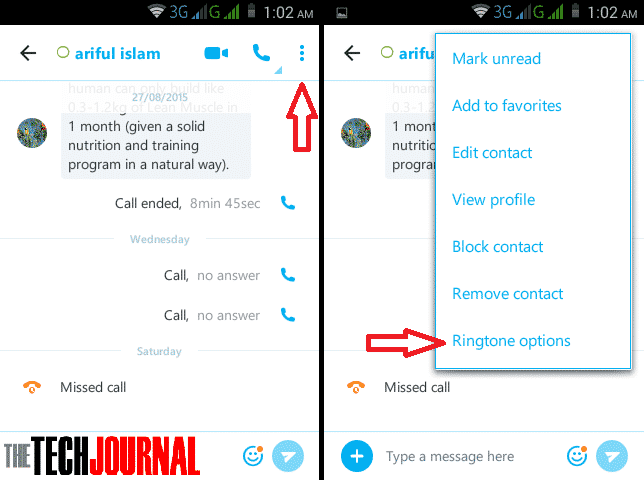
Step 2: Open a conversation and go to menu in the lower right-hand corner. Then select Ringtone options.
Step 3: Now tap on Set a custom ringtone. Then select your ringtone.
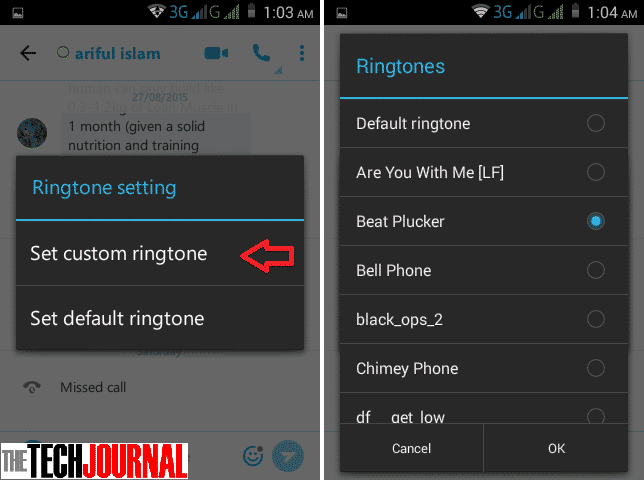
After doing this you will hear that ringtone when this contact will call you. If you want to change another contacts then do the same thing.
Source: CNET
[ttjad keyword=”android-phone”]
![Read more about the article [Tutorial] How To Disable Automatic Download Of Windows 8 Store App Updates](https://thetechjournal.com/wp-content/uploads/2013/01/enabled-apps-update-disable-as564w6e5r46w5e.webp)
![Read more about the article [Tutorial] How To Easily Reduce Video File Size Before Uploading It To Web](https://thetechjournal.com/wp-content/uploads/2012/11/add-videos-as5d498e7r98y7u.webp)
