website statistics

Samsung Galaxy S II Overclocked to a Blazing Fast 1.5GHz.

XDA member has overclocked the new Samsung Galaxy S II to a stable 1.5GHz. The dual core smartphone comes with a 1.2GHz stock cpu speed

When do you use Facebook?

View Results

Loading ... Loading ...
1 Star2 Stars3 Stars4 Stars5 Stars (Rate This)
Loading ... Loading ...

It was recently dubbed the “fastest smartphone”, and it looks like it’s staying true to its name.  The brand new Samsung Galaxy S II has gotten its first taste of overclocking, thanks to our friends at XDA.
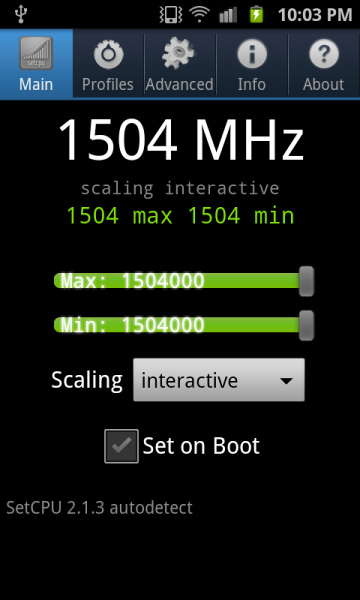
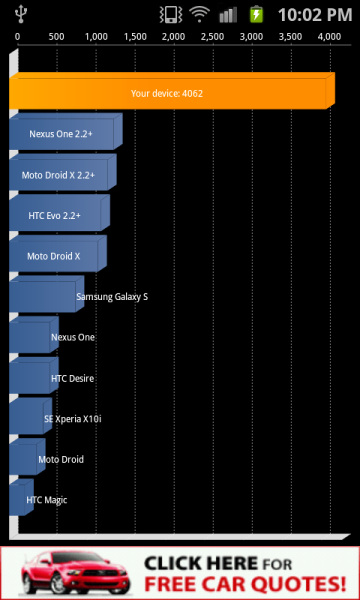
galaxy s 2 scoresgalaxy s 2 scores 2

A user by the name of coolbho3000, at XDA Developers Forums, has put together some code that overclocks the Galaxy S II to a fast and stable 1.5GHz.  The keyword being stable, coolbho3000 has said that he has reached 1.8GHz and a whopping 2.0GHz, but at those speeds he was having stability issues.  He said he was going to leave the faster speeds and voltage increases to any Dev that wants to take a stab at it.

Samsung originally planned to leave the dual core monster at 1GHz, but at the last minute decided to push it 1.2GHz stock.  That extra speed boost makes a big difference in the benchmarking scores.  The Galaxy S II at stock speeds, put up some a decent Linpack scores, and some pretty impressive Quadrant scores.  But at 1.5GHz those scores skyrocketed, I think it’s the first device to reach 4000+ on Quadrant.  Now that’s impressive.

If you’re a lucky Samsung Galaxy S II owner and cant wait to push your phone to the max, you can head over to the original thread XDA and join the conversation.  The original source code for developers has been posted on github, thanks to coolbho3000. Actually all thanks goes to that guy.

[via XDA Developers Forum]

Buy Cheapest Related Product From Amazon.com


Rumor of Next Gen iPod Nano To Reinstate a Camera

Sprint’s Fight To Smear AT&T’s Proposed Takeover Of T-Mobile USA
You can also press the left/right arrow key on your keyboard to go to previous/next post
  On May 13, 2011(2 years, 0 months ago.)
  • http://viettelonline.com/ USB 3G

     Oh thanks, i appriciate that!


Recent Search

Recent Tutorials

This tutorial will show how to use S.M.A.R.T. (Self Monitoring Analysis and Reporting Technology) to continuously collect information on health of your equipment.
In this tutorial I'll show you how you can easily protect yourself from any kind of security breaks that may occur through Java.
Today Apple enabled "Two Step Verification" for iCloud And Apple ID. But the process is not that simple. But no worry, here we have made a step by step tutorial.
Cant remember your iPhone passcode? Here I will show you some workaround on what to do and how to recover and restore for every possible scenario.
This tutorial will show you how to perform the Winapp2.ini installation inside CCleaner and how to use it under Windows operating system.
With app called AD Sound Recorder, you can record any stream that passes through your sound card or speakers and in this tutorial I will show you how to do that.
If you want to have Boxee app inside your Apple TV, in this tutorial we will show you how to install XBMC and Boxee using Windows on your Apple TV.
This tutorial will show you how to transfer PS3 Saved Game Files from your PC to your PS3 game console.
Adding videos from external sources such as internet, more specifically from YouTube, is a great solution to enhance a presentation; in this tutorial I will show you the procedure.
If you are one of new comers to Windows Phone 8, like me, in this tutorial I will walk you through the process to update your Windows Phone 8 device.
Close You Have To Login
User:
Pass:
Login With »Login With TwitterLogin With Facebook